🧬 Flask Track Docs

Alerts & Operational Notifications

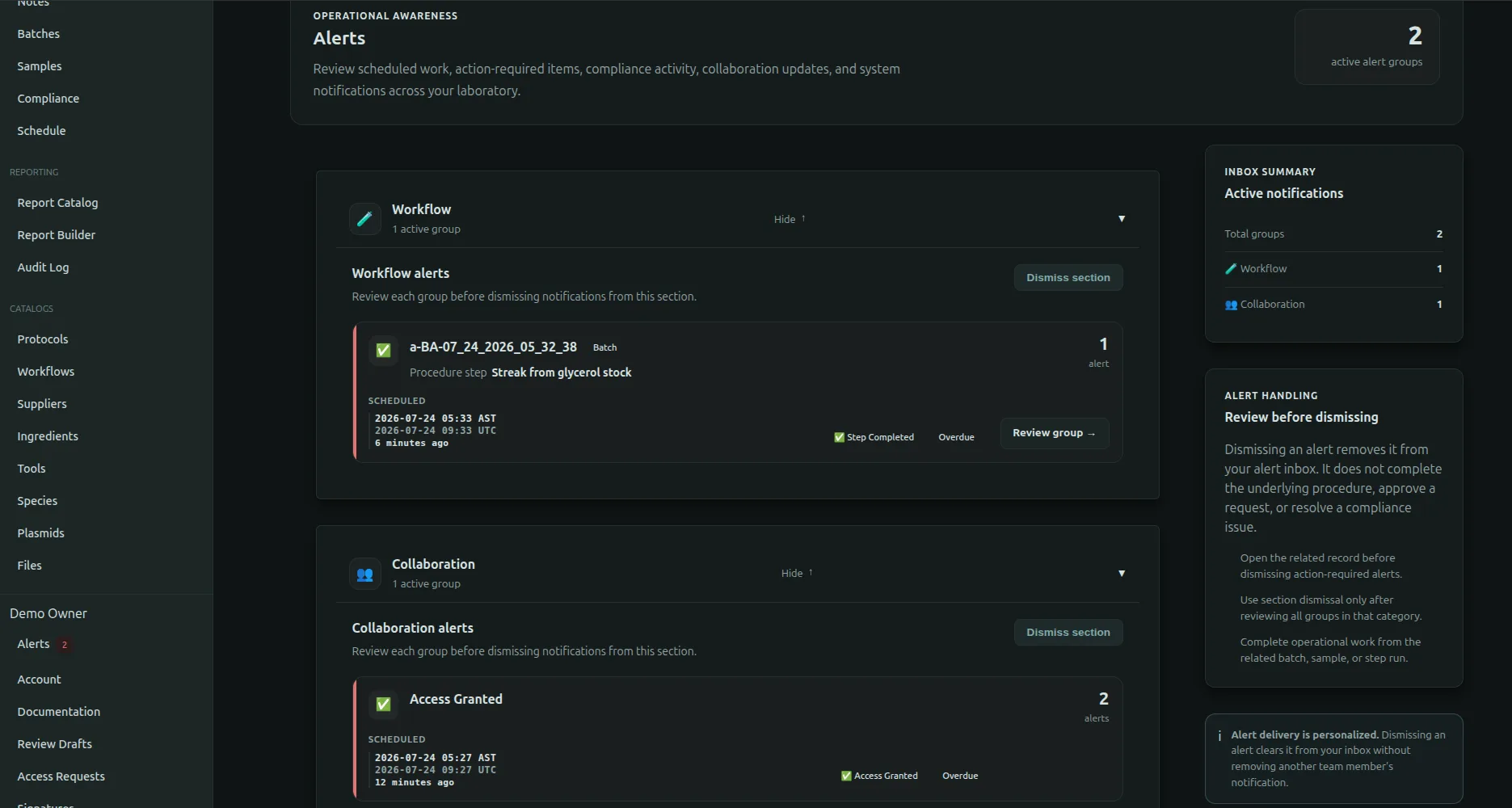
Flask Track includes a built-in alerting and operational notification system designed to support time-sensitive laboratory execution.

Alerts help laboratory teams coordinate workflows, maintain protocol timing requirements, and identify operational risks before they become compliance or execution failures.

The alert system is deeply integrated into:

Alerts are generated from real execution state and scheduling logic — not static reminders.


Purpose of Alerts

Many laboratory procedures are highly time-sensitive.

Examples include:

Missed timing windows can lead to:

Flask Track alerts help ensure operational timing remains visible, coordinated, and traceable.


What Alerts Monitor

Alerts are generated from active operational execution data.

This may include:

Alerts are associated directly with real protocol step runs and execution records.


Alert Lifecycle

Alerts are created, updated, and resolved automatically as execution progresses.

Typical lifecycle stages include:

  1. Scheduled
  2. Upcoming
  3. Active
  4. Overdue
  5. Resolved
  6. Archived as historical execution data

Alerts remain connected to the permanent operational record even after resolution.


Timing & Scheduling Logic

Alert generation is driven by protocol timing definitions and workflow scheduling systems.

Supported timing models may include:

Execution scheduling is dynamically calculated from:

This allows Flask Track to model real laboratory timing behavior rather than simple calendar reminders.


Alert Types

Flask Track supports multiple operational alert categories.


Upcoming Alerts

Upcoming alerts are generated when a protocol step is approaching its scheduled execution window.

These alerts help teams:

Upcoming alerts improve operational readiness before execution deadlines occur.


Active Alerts

Active alerts indicate protocol steps that currently require operational attention.

Examples include:

These alerts help laboratories maintain workflow momentum and visibility.


Overdue Alerts

Overdue alerts are generated when a protocol step exceeds its expected execution timing without completion.

Overdue alerts may indicate:

Overdue alerts are operationally significant because timing deviations may affect reproducibility and compliance outcomes.


Compliance Alerts

Some deployments may generate compliance-related alerts tied to:

These alerts help organizations maintain operational and regulatory oversight.


Alert Context & Scope

Alerts are contextual and tied directly to operational entities.

Each alert may reference:

This ensures alerts remain actionable rather than generic notifications.


Alert Visibility

Alerts may appear throughout the Flask Track interface.

Examples include:

Alert visibility may vary depending on:


Multi-User Coordination

Alerts are designed to support collaborative laboratory environments.

This is particularly important for:

Alerts help teams:

This reduces reliance on manual communication and institutional memory.


Alert Resolution

Alerts are resolved automatically or operationally depending on execution state.

Typical resolution events include:

Resolved alerts remain preserved in historical execution records.

This maintains long-term operational traceability.


Alerts & Compliance

Alerts are operationally and compliance relevant.

They help document:

Alert history may be reviewed during:

Alerts provide early visibility into operational risk before failures become formal compliance incidents.


Alerts & Deviations

Alerts do not automatically create protocol deviations or non-conformance records.

However:

This design prevents unnecessary escalation while preserving accountability and traceability.


Automation & Notification Systems

Alerts integrate closely with Flask Track automation systems.

Depending on deployment, alerts may support:

Automation allows laboratories to coordinate execution without requiring constant manual monitoring.


API Integration

Alerts are fully integrated into the Flask Track API layer.

Authorized systems may:

API access follows the same permission and audit rules enforced throughout the platform.


Audit Logging & Traceability

Alert-related activity is fully traceable.

Audit systems may record:

This ensures organizations can reconstruct operational timelines and understand how execution issues were handled.


Operational Benefits

The alert system helps laboratories:

Alerts become part of the operational quality system rather than isolated reminders.


Best Practices

Recommended operational practices include:

Consistent alert management improves both operational reliability and audit readiness.


Summary

Flask Track alerts provide operational awareness across laboratory workflows, execution schedules, and compliance-sensitive procedures.

By integrating directly with workflow scheduling, protocol timing logic, execution tracking, and compliance systems, alerts help laboratories:

Alerts are not simply reminders — they are an integrated part of the laboratory execution and quality management system.