icon file Flask Track Docs

Compliance Guide

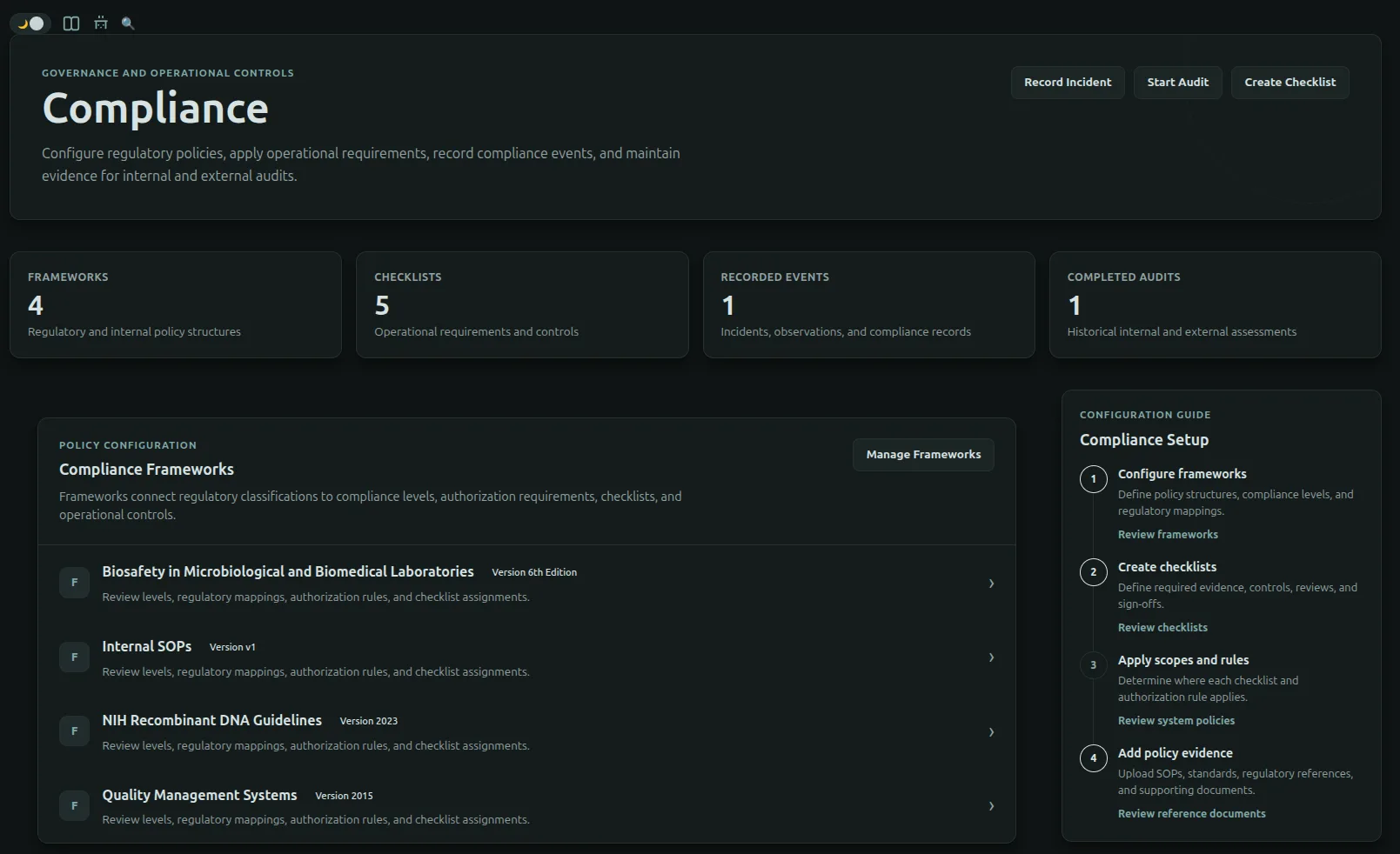
FlaskTrack's compliance system is built around Audit Frameworks.

An Audit Framework defines how your organization interprets regulatory requirements, laboratory policies, and internal operating procedures. Frameworks determine what compliance requirements exist, where they apply, and how they influence laboratory execution.

Rather than applying rules globally, FlaskTrack evaluates compliance dynamically using framework configuration, checklist scope, regulatory tags, and authorization rules.

This ensures compliance requirements are enforced only where they are applicable.


Compliance Architecture

flowchart TB

    Framework["Audit Framework"]

    Framework --> Checklists["Compliance Checklists"]
    Framework --> Tags["Regulatory Tag Mappings"]
    Framework --> Rules["Authorization Rules"]

    Checklists --> Scope["Checklist Scope Rules"]
    Tags --> Severity["Compliance Severity"]

    Scope --> Evaluation["Compliance Evaluation"]
    Severity --> Evaluation
    Rules --> Evaluation

    Evaluation --> Execution["Protocol Step Completion"]

An Audit Framework controls:


Audit Frameworks

Audit Frameworks are the foundation of FlaskTrack's compliance engine.

A framework represents a regulatory standard, organizational policy, laboratory standard, or quality management system.

Examples include:

Each framework contains its own independent compliance configuration, including:

Multiple frameworks may be active simultaneously.

During execution, FlaskTrack evaluates every applicable framework and determines the effective compliance policy.


Compliance Checklists

Compliance Checklists define the requirements that must be satisfied before laboratory work is considered compliant.

A checklist may require:

Checklists themselves contain no logic about where they apply.

Instead, they are attached to an Audit Framework and controlled through Checklist Scope Rules.

Examples include:

flowchart LR

    Framework["Audit Framework"]

    Framework --> Checklist["Compliance Checklist"]

    Checklist --> Items["Checklist Items"]

    Items --> Evidence["Optional Evidence Upload"]

Checklist Scope

Checklist Scope determines where a checklist is enforced.

Rather than applying every checklist everywhere, FlaskTrack evaluates scope rules against the current laboratory context.

Scope rules may evaluate:

Supported entity types include:

flowchart TB

    Checklist

    Checklist --> Scope["Scope Rules"]

    Scope --> Entity["Entity"]
    Scope --> Domain["Domain"]
    Scope --> Tags["Regulatory Tags"]

    Entity --> Applies["Checklist Applies"]
    Domain --> Applies
    Tags --> Applies

Only matching checklists are enforced.

For example, an Agrobacterium checklist may only apply to Agrobacterium workflows that contain GMO regulatory tags.


Regulatory Tag Mappings

Regulatory Tags classify laboratory entities according to compliance requirements.

Examples include:

Frameworks map these tags to an organizational Compliance Severity.

Examples:

Regulatory Tag Example Severity
Human Pathogen Critical
Animal Pathogen Critical
Restricted High
Controlled High
GMO Medium
BSL-2 Medium
BSL-1 Low

Because mappings belong to a framework, different organizations may interpret the same regulatory tag differently.

flowchart LR

    Tag["Regulatory Tag"]

    Tag --> Mapping["Framework Mapping"]

    Mapping --> Severity["Compliance Severity"]

Authorization Rules

Authorization Rules determine how FlaskTrack responds when a particular compliance severity is encountered.

Rather than attaching permissions directly to users, frameworks convert compliance severity into authorization behavior.

Current authorization primarily governs Protocol Step Completion.

Each rule may result in one of three outcomes:

flowchart TB

    Severity["Compliance Severity"]

    Severity --> Rule["Authorization Rule"]

    Rule --> Allow["Allow"]

    Rule --> Approval["Require Approval"]

    Rule --> Block["Block"]

For example:

Severity Protocol Step Completion
Low Allow
Medium Allow
High Require Approval
Critical Block

As additional compliance-controlled operations are introduced throughout FlaskTrack, they will use this same authorization system.


Enforcement During Laboratory Execution

Compliance enforcement occurs automatically during laboratory execution.

Today this primarily occurs when an operator attempts to complete a protocol step.

flowchart LR

    Operator["Operator Completes Step"]

    Operator --> Frameworks["Evaluate Audit Frameworks"]

    Frameworks --> Scope["Evaluate Checklist Scope"]

    Scope --> Tags["Evaluate Regulatory Tags"]

    Tags --> Rules["Authorization Rules"]

    Rules --> Result["Allow / Approval / Block"]

If the resulting policy requires approval, FlaskTrack prompts the operator to submit an approval request.

If the resulting policy blocks the action, the protocol step cannot be completed.


Compliance Preview

Every Audit Framework includes a Compliance Preview.

The preview allows administrators to understand exactly how the framework will behave before deploying it into production.

Administrators may select an entity such as:

FlaskTrack then evaluates the framework and displays:

flowchart LR

    Entity["Select Entity"]

    Entity --> Evaluate["Framework Evaluation"]

    Evaluate --> Checklists["Applicable Checklists"]

    Evaluate --> Severity["Compliance Severity"]

    Evaluate --> Result["Authorization Result"]

    Result --> Reasoning["Verbose Reasoning"]

This makes compliance configuration transparent and significantly simplifies troubleshooting.


Policy Matrix

While the Compliance Preview evaluates a single framework, the Organization Policy Matrix evaluates every active framework simultaneously.

The Policy Matrix displays the effective authorization policy that operators will experience during laboratory execution.

It answers questions such as:

Because it evaluates the entire organization, the Policy Matrix is the definitive reference for understanding effective compliance behavior.


Recommended Setup

A typical compliance implementation follows this sequence.

flowchart TB

    Framework["Create Audit Framework"]

    Framework --> Checklist["Create Compliance Checklists"]

    Checklist --> Scope["Configure Checklist Scope"]

    Scope --> Tags["Map Regulatory Tags"]

    Tags --> Rules["Configure Authorization Rules"]

    Rules --> Preview["Validate Using Compliance Preview"]

    Preview --> Matrix["Review Organization Policy Matrix"]

    Matrix --> Production["Laboratory Execution"]

Following this process allows compliance requirements to be reviewed and validated before affecting laboratory operators.


Example

An organization creates a framework based on the NIH Recombinant DNA Guidelines.

The framework contains:

When an operator attempts to complete a protocol step:

  1. FlaskTrack evaluates applicable frameworks.
  2. Matching checklist scopes are identified.
  3. Regulatory tags determine compliance severity.
  4. Authorization rules determine the effective policy.
  5. The operator is either allowed to continue, prompted to request approval, or blocked.
  6. The decision becomes part of the permanent audit history.

Why This Architecture

FlaskTrack separates compliance into reusable building blocks.

Frameworks define policy.

Checklists define requirements.

Scope determines where requirements apply.

Regulatory tags define risk.

Authorization Rules determine how protocol execution is affected.

This modular architecture allows organizations to implement sophisticated compliance programs without forcing unrelated laboratory work to satisfy unnecessary requirements, while still maintaining complete traceability and auditability.