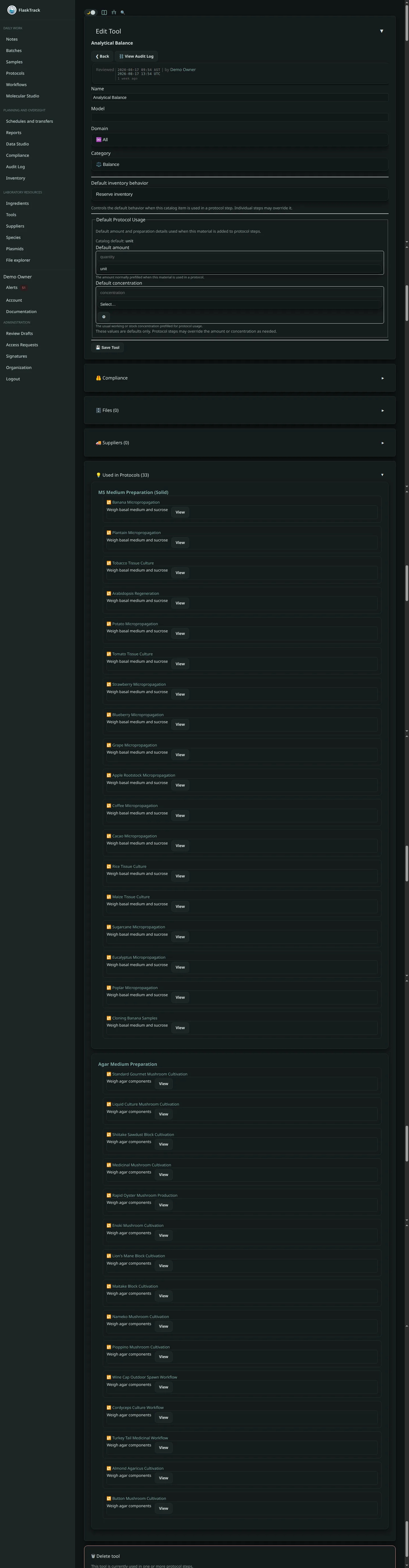
Tools
Tools represent the equipment, infrastructure, and operational environments used throughout laboratory execution.
They provide a reusable, traceable, and compliance-aware catalog of operational resources that can be referenced across protocols, workflows, batches, and execution records.
By modeling tools as structured entities rather than freeform text, Flask Track improves:
- Reproducibility
- Operational consistency
- Auditability
- Compliance visibility
- Equipment traceability
- Laboratory standardization
What Is a Tool?
A tool is any physical or operational resource required to perform laboratory work.
Examples include:
- Chemical fume hoods
- Laminar flow hoods
- Still air boxes
- Autoclaves
- Incubators
- Shakers
- Centrifuges
- Environmental chambers
- Benches and workstations
- Microscopes
- Sterilization systems
- Containment devices
- Measurement instruments
Tools may represent:
- Individual devices
- Shared laboratory infrastructure
- Operational environments
- Facility resources
- Specialized execution systems
Tools are cataloged once and reused throughout the platform.
Why Tools Matter
In many laboratory environments, equipment configuration and operational context are just as important as the biological procedure itself.
Improper or inconsistent equipment usage can affect:
- Experimental reproducibility
- Regulatory compliance
- Sterility and contamination control
- Environmental consistency
- Audit defensibility
- Operator safety
Flask Track allows organizations to formally model and track these operational dependencies.
Tool Metadata
Each tool includes structured operational metadata used throughout the platform.
Name
The tool name is the primary human-readable identifier.
Examples:
- Class II Biosafety Cabinet
- Bench Autoclave
- Orbital Shaker
- Chemical Fume Hood
- Growth Chamber A
Consistent naming improves:
- Workflow readability
- Reporting clarity
- Execution consistency
- Audit traceability
Domain
The domain defines the operational context where the tool is primarily used.
Examples may include:
- Tissue Culture
- Fungus
- Agrobacterium
- Fermentation
- General Laboratory Operations
Domains help organize equipment and improve compatibility filtering during protocol authoring.
Default Unit
Tools may define a default operational unit used during execution tracking.
Examples include:
- unit
- cycles
- minutes
- hours
- runs
This supports standardized operational references within protocol steps and execution records.
Files & Documentation
Tools may contain attached operational and compliance documentation.
Examples include:
- Operating manuals
- SOPs
- Calibration certificates
- Inspection reports
- Validation records
- Maintenance logs
- Safety documentation
- Equipment images
- Training materials
Files attached to tools become globally accessible anywhere the tool is referenced.
Tool-Level File Management
Tool-level files provide centralized operational documentation.
Benefits include:
- Consistent procedural references
- Shared operational context
- Easier compliance review
- Improved audit readiness
- Reduced duplication across protocols
All file activity remains traceable through the audit system.
Suppliers & Procurement
Tools may optionally be linked to supplier records.
Supplier associations may include:
- Vendor names
- Catalog numbers
- Product URLs
- Pricing information
- Lead times
- Preferred vendors
- Procurement notes
Supplier tracking supports:
- Purchasing workflows
- Equipment replacement planning
- Inventory coordination
- Audit and sourcing traceability
Supplier relationships are optional and do not affect operational usage.
Tool Usage in Protocols
Tools are primarily referenced within protocol steps.
When a tool is attached to a protocol step:
- It appears during execution
- Operators can reference operational notes
- Usage becomes part of the execution history
- Tool context becomes audit-visible
This ensures laboratories can document not only what work occurred, but also the operational environment in which it occurred.
Step-Level Tool Configuration
Protocol steps may define tool-specific operational details such as:
- Usage instructions
- Operational settings
- Safety notes
- Environmental requirements
- Calibration reminders
- Execution guidance
Examples:
- Operate shaker at 120 RPM
- Maintain hood airflow certification
- Use sterile autoclave cycle
- Preheat chamber before transfer
These details improve execution consistency and operational clarity.
Operational Traceability
Tool usage becomes part of the permanent laboratory execution record.
This allows organizations to reconstruct:
- Which equipment was used
- During which procedures
- By which users
- Under which conditions
- Within which batches or workflows
Operational traceability is critical for:
- Investigations
- Root cause analysis
- Quality systems
- Regulated workflows
- Long-term reproducibility
Compliance & Regulatory Integration
Tools may carry compliance significance depending on organizational policies.
Examples include:
- Biosafety equipment
- Calibrated instruments
- Sterilization systems
- Restricted containment environments
- Certified operational equipment
Tools may be associated with:
- Compliance checklists
- Inspection schedules
- Calibration requirements
- Safety documentation
- Authorization rules
- Audit review procedures
This helps organizations integrate operational equipment management into broader quality systems.
Auditing & Change History
All tool-related activity is traceable.
Audit systems may record:
- Tool creation
- Metadata changes
- File uploads and removals
- Supplier updates
- Protocol usage
- Execution references
Audit visibility supports:
- Regulatory inspections
- Equipment investigations
- Quality reviews
- Operational accountability
Shared Operational Resources
Tools are reusable organizational resources.
A single tool may appear across:
- Many protocols
- Multiple workflows
- Numerous batches
- Long-running operational histories
This reuse model improves:
- Standardization
- Consistency
- Training
- Reporting accuracy
- Operational governance
When to Create a Tool
Organizations should create tool records when equipment:
- Is reused operationally
- Has compliance relevance
- Requires inspection or calibration tracking
- Needs attached documentation
- Appears in multiple protocols
- Influences reproducibility
- Requires operational traceability
Modeling important operational infrastructure explicitly improves both execution quality and long-term audit readiness.
Best Practices
Recommended practices include:
- Use consistent naming conventions
- Attach operational documentation directly to tools
- Include calibration or inspection evidence where applicable
- Reuse shared tools across protocols
- Avoid duplicate equipment records
- Document safety or operational constraints clearly
- Periodically review outdated or retired equipment
Well-maintained tool catalogs improve operational consistency across the organization.
Relationship to Protocols & Workflows
Tools themselves do not execute work.
Instead:
- Protocols define how tools are used
- Workflows organize when protocols execute
- Batches instantiate real operational execution
- Execution systems record actual tool usage
This separation improves:
- Reusability
- Operational flexibility
- Compliance visibility
- Traceability
Suppliers & Procurement
Tools may optionally be linked to suppliers and supplier-specific purchasing records.
This allows organizations to track not only what equipment is used operationally, but also:
- Where it was sourced
- Which vendor supplied it
- Purchasing details
- Pricing information
- Replacement options
- Procurement history
- Preferred sourcing relationships
Supplier integration connects operational equipment management directly to procurement and audit systems.
Supplier Records
Suppliers represent vendors, manufacturers, distributors, or procurement sources.
Examples include:
- Laboratory equipment vendors
- Scientific distributors
- Specialized manufacturers
- Internal procurement sources
Supplier records may include:
- Supplier name
- Website or ordering URLs
- Contact information
- Internal notes
- Preferred vendor status
Suppliers are reusable across:
- Tools
- Ingredients
- Plasmids
- Species-related materials
- Operational resources
Supplier Items
Supplier Items represent purchasable vendor-specific entries associated with a tool.
A single tool may have multiple supplier items representing:
- Different vendors
- Different models
- Alternate purchasing options
- Replacement components
- Vendor-specific configurations
Examples:
| Tool | Supplier Item |
|---|---|
| Orbital Shaker | Vendor A Model X |
| Orbital Shaker | Vendor B Compact Variant |
| Autoclave | Refurbished Unit |
| Laminar Hood | Certified Replacement Filter Kit |
This allows operational equipment definitions to remain stable while procurement options evolve independently.
Supplier Item Metadata
Supplier items may contain:
- Catalog or part numbers
- Vendor-specific naming
- Product URLs
- Pricing information
- Currency
- Lead times
- Preferred supplier flags
- Procurement notes
- Packaging or quantity information
This supports operational planning and procurement visibility directly inside laboratory workflows.
Pricing & Procurement Visibility
Supplier-linked pricing enables organizations to:
- Estimate operational costs
- Compare sourcing options
- Plan equipment purchases
- Review preferred vendors
- Standardize procurement decisions
Pricing data may also support:
- Procurement estimates
- Workflow costing
- Inventory planning
- Budget review processes
Supplier information remains operationally useful without being required for execution.
Procurement & Workflow Planning
Because tools are referenced directly within protocols and workflows, supplier-linked data helps organizations understand:
- What equipment is required
- Which vendors provide it
- Approximate operational costs
- Potential sourcing bottlenecks
This improves planning for:
- New laboratory builds
- Workflow deployment
- Facility expansion
- Experimental scaling
- Regulated operational environments
Audit & Traceability
Supplier associations and procurement metadata are fully traceable.
Audit systems may record:
- Supplier item creation
- Pricing updates
- Vendor changes
- Preferred supplier updates
- Procurement-related metadata changes
This helps organizations maintain defensible sourcing and operational traceability.
Best Practices
Recommended practices include:
- Link commonly used tools to supplier items
- Maintain accurate catalog numbers
- Mark preferred procurement sources
- Keep pricing information reasonably current
- Avoid duplicate supplier records
- Separate operational tool definitions from vendor-specific purchasing data
This separation improves long-term maintainability and procurement flexibility.
Relationship to Execution
Supplier and procurement information does not directly affect protocol execution.
Instead:
- Tools define operational resources
- Supplier items define purchasing and sourcing options
- Protocols reference the operational tool
- Workflows organize execution sequencing
This separation keeps execution systems stable even when vendors or procurement sources change.
Supplier and supplier item integration allows Flask Track to bridge operational laboratory execution with procurement and sourcing management.
By linking reusable operational tools to structured vendor-specific purchasing records, organizations can:
- Improve procurement visibility
- Standardize sourcing
- Estimate operational costs
- Maintain audit-ready purchasing records
- Coordinate equipment planning
- Support scalable laboratory operations
This creates a more complete operational model where equipment, execution, and procurement remain connected while still independently manageable.
Summary
Tools provide a structured operational layer for managing laboratory equipment, environments, and execution infrastructure.
By separating tools from protocols while maintaining strong integration with execution, compliance, and audit systems, Flask Track enables laboratories to:
- Standardize operational resources
- Improve reproducibility
- Maintain equipment traceability
- Strengthen compliance readiness
- Centralize operational documentation
- Support scalable laboratory execution
Tools are more than inventory records — they are part of the operational context that defines how laboratory work is actually performed.