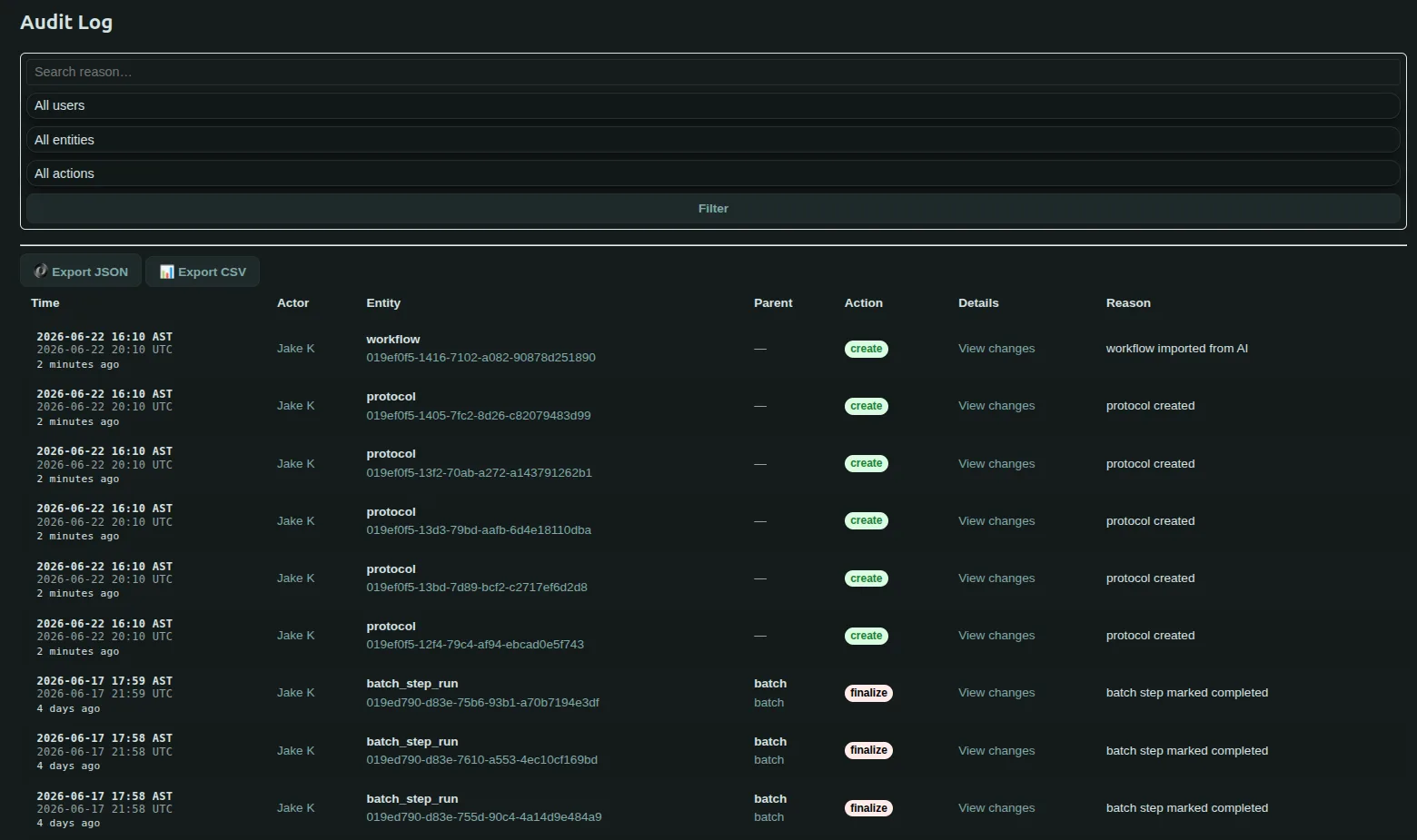
Audit Log
The Audit Log is the immutable system of record for operational activity within Flask Track.
It provides a complete, append-only history of significant actions performed across the platform, enabling:
- Traceability
- Accountability
- Regulatory defensibility
- Incident investigation
- Operational reconstruction
- Compliance verification
Every significant operational and compliance-related action is recorded automatically and preserved permanently.
What Is the Audit Log?
The Audit Log records:
- Who performed an action
- What action occurred
- Which entity was affected
- When the action happened
- What changed
- Why the action occurred (when provided)
The audit log exists to create a complete historical record of laboratory operations and system activity.
It acts as the authoritative operational history for the organization.
Why the Audit Log Matters
In regulated and operationally controlled environments, organizations must be able to answer questions such as:
- Who changed this protocol?
- When was this batch approved?
- What did the sample state used to be?
- Which user uploaded this evidence?
- Was this workflow executed before approval?
- What happened before the incident occurred?
The audit log provides defensible answers to these questions automatically.
Immutable by Design
Audit log records are immutable.
Once an entry is written:
- It cannot be modified
- It cannot be deleted
- It cannot be silently replaced
- Historical order is preserved permanently
This ensures operational and regulatory integrity.
Blockchain-Style Integrity Protection
Flask Track uses a cryptographically chained audit logging model to protect audit integrity.
Each audit record is checksum-linked to previous entries, creating a tamper-evident chain of operational history.
This provides:
- Immutable sequencing
- Tamper detection
- Historical integrity verification
- Strong audit defensibility
If an entry were altered retroactively, the chain integrity would no longer validate.
What Gets Logged
The audit system records significant activity across the platform.
Examples include actions involving:
- Organizations
- Users
- Species
- Ingredients
- Tools
- Plasmids
- Protocols
- Workflows
- Batches
- Samples
- Compliance entities
- Files
- Reports
- Audits
- Compliance events
- Authorization actions
Audit coverage spans both operational execution and administrative activity.
Operational Activity Tracking
Operational workflow activity is fully audited.
Examples include:
- Workflow execution
- Protocol completion
- Sample state changes
- Batch progression
- Checklist completion
- Evidence uploads
- Compliance approvals
- Corrective actions
This creates end-to-end operational traceability.
Administrative Activity Tracking
Administrative actions are also audited.
Examples include:
- User creation
- Role changes
- Framework updates
- Configuration changes
- Permission updates
- Supplier modifications
- Compliance rule changes
Administrative visibility is critical for regulated environments.
Logged Actions
Each audit entry includes a structured action type.
Examples include:
- Create
- Update
- Delete
- Archive
- Restore
- Approve
- Reject
- Finalize
- Execute
- Complete
- Upload
- Attach
- Detach
- Login
- Logout
- Escalate
Structured action typing improves filtering, reporting, and investigation workflows.
Audit Log Fields
Each audit entry preserves structured operational metadata.
Typical fields include:
| Field | Description |
|---|---|
| Timestamp | When the action occurred |
| Actor | The user or system process |
| Entity Type | What type of object was affected |
| Entity ID | The specific affected entity |
| Action | The operation performed |
| Before State | Previous entity state |
| After State | New entity state |
| Reason | Optional user-provided explanation |
| Checksum | Cryptographic chain integrity reference |
This allows precise reconstruction of historical operational activity.
Before & After State Tracking
For mutating actions, Flask Track preserves both:
- The previous value (
before) - The new value (
after)
Examples include:
- Protocol edits
- Workflow modifications
- State transitions
- Metadata updates
- Authorization changes
This allows organizations to reconstruct operational history exactly as it occurred.
Example Audit Entry
Example operational record:
json id="kddny8"
{
"timestamp": "2026-05-16T14:22:11Z",
"actor": "jane.smith@example.com",
"entity_type": "protocol",
"entity_id": "019e1f5b...",
"action": "update",
"before": {
"approved": false
},
"after": {
"approved": true
},
"reason": "Protocol review completed"
}
Every audit record remains permanently preserved.
System Process Logging
The audit system also records certain automated system actions.
Examples include:
- Automatic alert generation
- Escalation creation
- Scheduled transitions
- Approval propagation
- Automated compliance evaluation
This ensures system-driven operational behavior remains traceable.
Login & Access Auditing
Authentication and access-related activity may also be audited.
Examples include:
- Login events
- Logout events
- Failed authorization attempts
- Role-based access checks
- Restricted action attempts
This improves security visibility and forensic traceability.
Compliance Integration
The audit log is deeply integrated with the compliance system.
Audit records support:
- Regulatory inspections
- Compliance investigations
- Corrective actions
- Operational review
- Root cause analysis
- Approval verification
The audit log acts as the authoritative evidence layer beneath the broader compliance architecture.
Relationship to Other Compliance Systems
The audit log complements several other systems within Flask Track.
| System | Purpose |
|---|---|
| Audit Log | Immutable operational history |
| Compliance Events | Incident & deviation tracking |
| Checklists | Operational compliance requirements |
| Audits | Formal compliance evaluation |
| Alerts | Runtime operational notifications |
Together, these systems create continuous traceability across laboratory operations.
Runtime Traceability
The audit log preserves the exact operational sequence of events.
Organizations can reconstruct:
- Workflow execution order
- User activity timelines
- Approval sequences
- Incident progression
- Compliance enforcement decisions
- Evidence submission history
This creates highly defensible operational records.
Filtering the Audit Log
The audit interface supports advanced filtering and investigation workflows.
Audit records may be filtered by:
- Entity type
- Entity identifier
- User
- Action type
- Time range
- Reason text
- Severity
- Compliance context
This makes it possible to investigate specific operational situations quickly.
Common Investigation Scenarios
Examples include:
| Investigation Goal | Example Filter |
|---|---|
| Review sample history | Entity = Sample |
| Find protocol approvals | Action = Approve |
| Review contamination timeline | Related compliance events |
| Investigate user actions | Actor filter |
| Review workflow modifications | Entity = Workflow |
Operational reconstruction becomes significantly easier with structured filtering.
Exporting Audit Data
Audit records can be exported for:
- Regulatory review
- External audits
- Internal investigations
- Long-term archival
- Data analysis
Supported export formats may include:
- JSON
- CSV
- Structured reports
- API-driven exports
Exports preserve all visible operational metadata and applied filters.
Historical Reconstruction
Because audit records are immutable and timestamped, organizations can reconstruct:
- Exact operational state
- Historical workflow configuration
- Approval history
- Evidence timelines
- Incident progression
- User decision paths
This is critical for:
- Regulated environments
- Legal defensibility
- Quality systems
- Incident investigations
Audit Log Security
Audit log integrity is protected through several mechanisms:
- Append-only storage
- Cryptographic checksums
- Immutable chaining
- Role-based access controls
- Historical preservation
- Tamper-evident sequencing
These protections help ensure records remain trustworthy over time.
Access Control
Audit log visibility is role-controlled.
Typical access models include:
| Role | Typical Access |
|---|---|
| Owner | Full access |
| Administrator | Full operational access |
| Scientist | Read-only operational visibility |
| Technician | Limited operational visibility |
| Auditor | Review-focused access |
Access itself may also be audited.
Audit Readiness
The audit log is designed to support:
- Internal reviews
- Regulatory inspections
- Compliance certification
- Quality management systems
- Operational investigations
Organizations should treat audit logs as authoritative operational records.
Best Practices
Recommended practices include:
- Provide meaningful reasons when prompted
- Review audit history regularly
- Investigate unusual operational patterns
- Export records before external audits
- Preserve long-term audit archives
- Restrict administrative access carefully
Strong audit hygiene improves both operational accountability and regulatory readiness.
Design Philosophy
The audit log is designed to be:
- Immutable
- Cryptographically verifiable
- Operationally complete
- Historically reconstructable
- Compliance-aware
- Fully traceable
The system prioritizes preserving operational truth over convenience.
Nothing is silently overwritten or hidden.
Key Assurance Statement
Every significant action in Flask Track becomes part of a permanent, cryptographically protected operational history.
The audit log ensures organizations can always determine:
- What happened
- Who performed the action
- When it occurred
- What changed
- Why it happened
- Whether the historical record remains intact
This creates strong traceability, accountability, and regulatory defensibility across the full laboratory lifecycle.
Summary
The Audit Log is the immutable operational backbone of Flask Track.
By combining:
- Append-only storage
- Cryptographic chaining
- Structured action records
- Before/after state preservation
- Runtime operational traceability
- Compliance integration
- Advanced filtering and exports
Flask Track provides a defensible, review-ready system of record for laboratory operations, compliance activity, workflow execution, and organizational oversight.