Organization Management
Organizations are the foundational security, operational, and compliance boundary within Flask Track.
Every record, workflow, audit event, and operational action belongs to an organization.
Organizations control:
- Data ownership
- User access
- Operational permissions
- Compliance enforcement
- Audit attribution
- Reporting scope
- Automation and integrations
Flask Track is designed for multi-user laboratory environments where accountability, traceability, and operational separation are critical.
What an Organization Represents
An organization typically represents:
- A laboratory
- A research group
- A company
- A facility
- A department
- A regulated operational unit
Organizations isolate data and operational activity from one another.
Users only have access to organizations they are explicitly assigned to.
This ensures:
- Secure data separation
- Controlled collaboration
- Compliance isolation
- Independent audit scope
- Operational accountability
Organization Scope
All major platform entities belong to an organization, including:
- Users and roles
- Protocols
- Workflows
- Batches
- Samples
- Compliance frameworks
- Audits and audit logs
- Files and attachments
- Ingredients and inventory entities
- Suppliers
- Plasmids and strains
- Reports and exports
- Automation systems
- API integrations
Organization ownership is enforced throughout the platform.
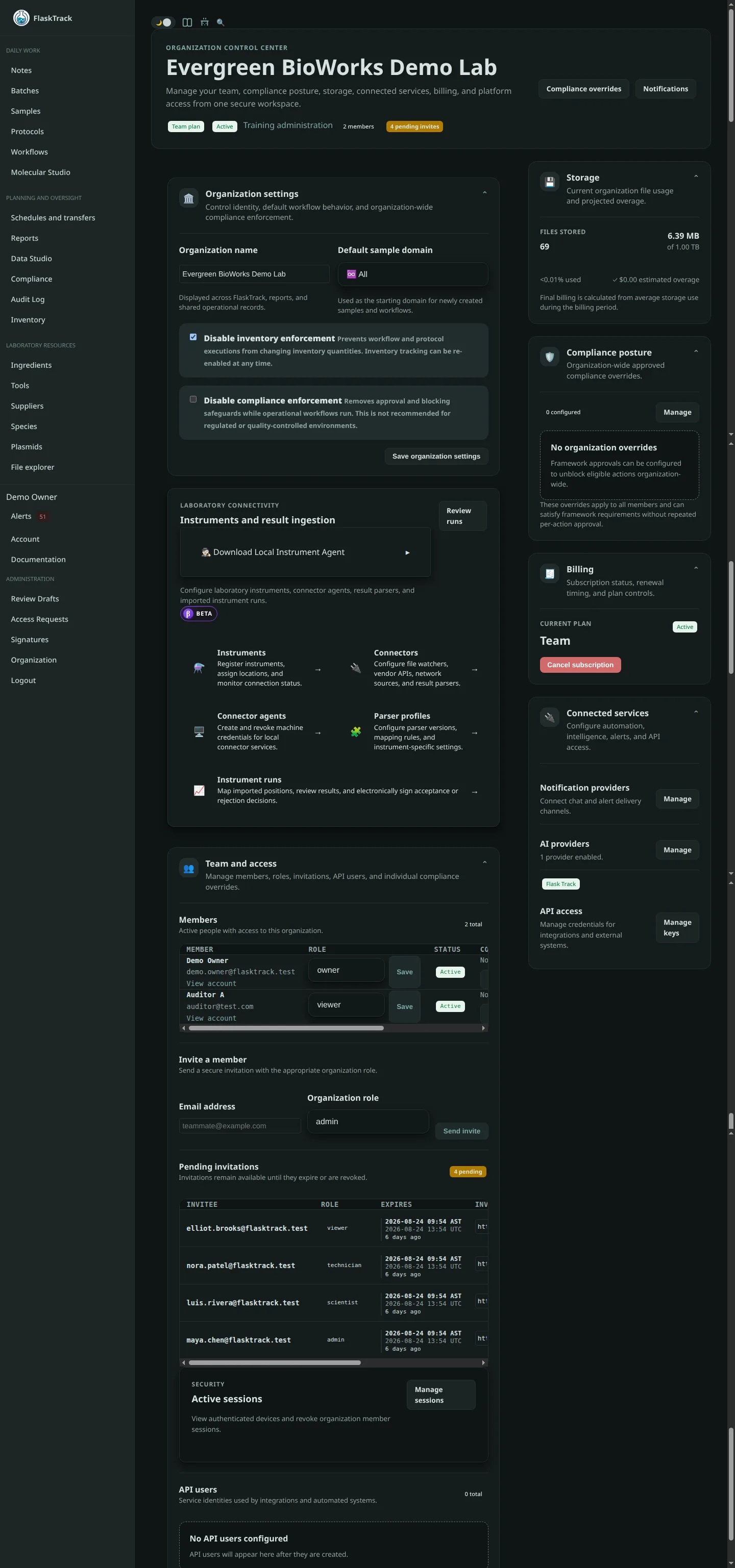
Organization Overview
Each organization contains:
- A unique identifier
- Organization metadata
- Members and roles
- Compliance ownership
- Shared operational resources
- Audit history
- Reporting scope
- Automation and integration settings
The organization acts as the central operational container for all laboratory activity.
Members & Access Control
The Members section displays all users associated with the organization.
For each member, Flask Track may display:
- Name
- Email address
- Assigned role
- Membership status
- Last activity information
- Invitation status
Membership determines what operational and administrative actions a user may perform.
Roles
Roles define a user’s permissions within the organization.
Permissions are enforced across:
- Data access
- Workflow execution
- Compliance systems
- Reporting
- Administrative features
- Automation and integrations
Owner
Owners have full organizational authority.
Typical capabilities include:
- Managing members and roles
- Configuring organizational settings
- Managing compliance frameworks
- Reviewing audits and reports
- Configuring integrations and automation
- Accessing billing or subscription settings
- Managing operational governance
Owner access should be assigned sparingly.
Admin
Admins manage day-to-day operational and administrative workflows.
Typical capabilities include:
- Managing protocols and workflows
- Managing batches and execution
- Inviting users
- Reviewing compliance activity
- Managing operational records
- Supporting laboratory operations
Admins generally cannot perform restricted ownership-level actions.
Scientist
Scientists manage scientific workflows and operational data.
Typical capabilities include:
- Authoring protocols
- Building workflows
- Executing laboratory work
- Recording scientific observations
- Uploading files and evidence
- Generating reports
Scientists generally cannot manage organizational users or ownership-level settings.
Technician
Technicians focus on operational execution.
Typical capabilities include:
- Completing protocol steps
- Recording execution data
- Uploading operational evidence
- Updating execution status
- Submitting structured forms
Technicians typically have limited administrative access.
Viewer
Viewers have read-only access.
This role is commonly used for:
- Auditors
- External reviewers
- Regulatory personnel
- Executives
- Collaborators
Viewers can inspect records and reports without modifying operational data.
Member Status
Each member has an account status that controls organizational access.
Active
Active users can:
- Log in
- Access organizational resources
- Perform actions allowed by their role
Deactivated
Deactivated users:
- Cannot log in
- Cannot perform actions
- Remain visible in historical records
- Preserve audit attribution and accountability
Flask Track strongly prefers deactivation over deletion to maintain traceability and audit integrity.
Inviting Members
Authorized users may invite additional organization members.
The invitation process typically includes:
- Entering the user’s email address
- Selecting an initial role
- Sending the invitation
Invited users appear in the Pending Invites section until the invitation is accepted.
Once accepted, the user becomes an active organization member.
Pending Invites
Pending invitations allow administrators to monitor outstanding access requests.
Administrators may:
- Review outstanding invites
- Revoke invitations
- Resend invitations
- Confirm expected membership changes
Pending invites help maintain visibility into organizational access management.
Organization Settings
Organization settings control shared operational and administrative configuration.
Depending on deployment and permissions, settings may include:
- Organization name
- Metadata and identifiers
- Default operational settings
- Compliance configuration
- Timezone and localization settings
- Branding configuration
- Integration settings
- Automation configuration
Organization metadata is referenced throughout the platform.
Billing & Subscription Management
Some deployments include subscription and usage management functionality.
Billing systems may include:
- Subscription plans
- Usage limits
- Invoice history
- Payment methods
- Feature access tiers
Billing access is generally restricted to organization owners.
Compliance & Audit Ownership
Organizations are tightly integrated with Flask Track’s compliance and audit systems.
Every operational action is associated with:
- An organization
- A user
- A role
- A timestamp
- A traceable operational context
This ensures laboratory activity remains attributable and reviewable.
Audit Attribution
Audit systems preserve:
- User identity
- Organizational membership
- Historical role assignments
- Before and after values
- Execution context
Even if users are later deactivated, their historical actions remain preserved.
This is critical for:
- Regulatory compliance
- Investigations
- Operational traceability
- Defensible audit records
Operational Isolation
Organizations are fully isolated from one another.
Users cannot access:
- Data from unrelated organizations
- Compliance records outside their organization
- Other organizations’ workflows or samples
- External audit histories
This isolation model supports:
- Multi-tenant deployments
- Research separation
- Confidentiality requirements
- Regulated operational boundaries
Automation & API Ownership
Automation systems and integrations are scoped to organizations.
This may include:
- API credentials
- Webhooks
- Scheduled automations
- Reporting exports
- External system integrations
- Notification systems
This ensures integrations remain securely isolated between organizations.
Best Practices
Recommended operational practices include:
- Limit the number of Owners
- Use Admin roles for operational leadership
- Use Viewer roles for external reviewers
- Deactivate users instead of deleting accounts
- Periodically review member access
- Separate operational and compliance responsibilities
- Maintain stable organization naming for reporting consistency
- Review pending invites regularly
Strong organizational management improves both security and audit readiness.
Security Model
Flask Track enforces permissions at both the interface and server level.
Even if a user manually attempts restricted actions:
- Unauthorized requests are denied
- Restricted data remains inaccessible
- Audit integrity is preserved
This defense-in-depth model helps protect sensitive laboratory and compliance data.
Summary
Organizations provide the operational and security foundation for Flask Track.
They enable:
- Secure multi-user collaboration
- Role-based access control
- Operational accountability
- Compliance ownership
- Audit traceability
- Data isolation
- Integration management
- Structured laboratory governance
By organizing all operational activity around organizational boundaries, Flask Track supports complex laboratory environments without compromising traceability, reproducibility, or control.