AI Integrations
FlaskTrack includes optional AI-powered capabilities designed to accelerate protocol creation, improve organizational knowledge discovery, simplify reporting, and reduce administrative overhead across laboratory and research operations.
AI features are entirely optional and require an organization administrator to configure an AI provider before they become available.
FlaskTrack does not provide AI models or API access by default.
Overview
FlaskTrack AI capabilities are designed to assist users while maintaining human oversight, traceability, and compliance.
Current AI-powered features include:
- Workflow Import Assistant
- Protocol Generation
- Automatic Material Creation
- Automatic Tool Creation
- Catalog Expansion Assistance
- AI Documentation Assistant
- Knowledge Base Search
- Retrieval-Augmented Generation (RAG)
- AI SQL Assistant
- AI Report Building Assistance
All AI-generated content should be reviewed before use in operational, scientific, manufacturing, or regulated environments.
AI Provider Configuration
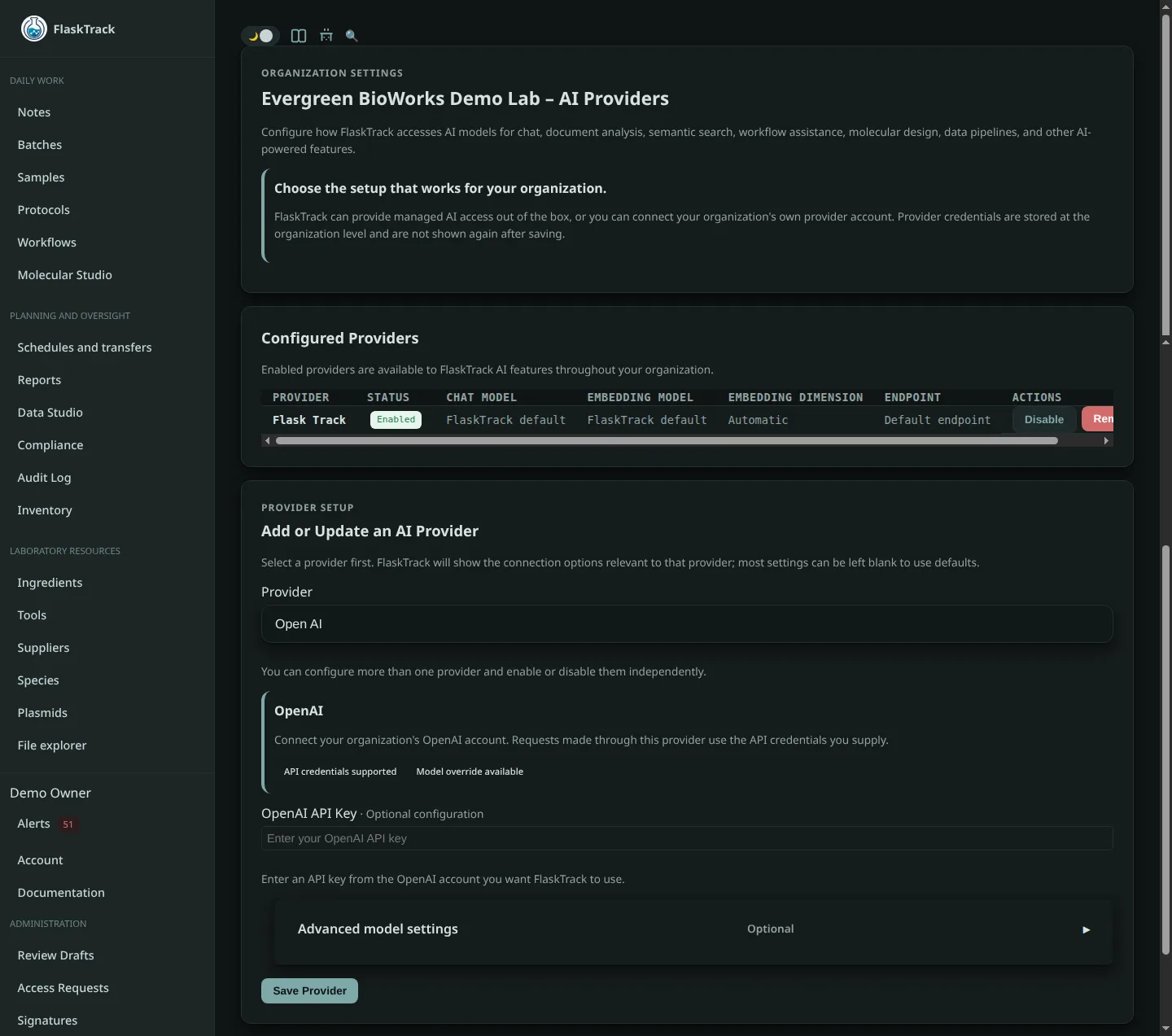
Before any AI features can be used, an administrator must configure an AI provider.
FlaskTrack supports organization-managed AI providers and does not include AI usage as part of the platform itself.
Organizations are responsible for:
- Selecting an AI provider
- Providing API credentials
- Configuring endpoints
- Selecting models
- Managing usage costs
- Maintaining provider access
If no AI provider is configured, AI functionality remains unavailable throughout the platform.
OpenAI Integration
Organizations may connect FlaskTrack to OpenAI using their own API credentials.
When using OpenAI, organizations are responsible for:
- Maintaining an active OpenAI account
- Managing API usage costs
- Selecting approved models
- Reviewing OpenAI policies and terms
OpenAI processing occurs according to the organization's configured settings and usage.
Ollama Integration
Organizations may connect FlaskTrack to a self-hosted Ollama deployment.
Ollama allows organizations to operate AI models entirely within their own infrastructure.
Organizations are responsible for:
- Hosting the Ollama server
- Managing model downloads
- Providing compute resources
- Securing AI infrastructure
- Maintaining model availability
This deployment option is often preferred by organizations with strict privacy, security, or compliance requirements.
AI Security & Privacy
FlaskTrack respects existing permission controls when using AI features.
AI assistants only access information the authenticated user is authorized to view.
Organizations control:
- Which AI provider is used
- Which models are available
- Which documents are indexed
- Which notes are indexed
- Which organizational records may participate in AI retrieval
Knowledge Base indexing does not bypass user permissions.
Users cannot retrieve information they would not otherwise be authorized to access.
Workflow Import Assistant
The Workflow Import Assistant converts existing documentation into structured FlaskTrack workflows.
Instead of manually creating protocols step-by-step, users can provide existing documentation and allow the AI assistant to generate an initial workflow draft.
Supported sources may include:
- SOPs
- Laboratory procedures
- Work instructions
- Research protocols
- Manufacturing procedures
- Internal documentation
- PDF files
- Word documents
- Markdown files
- Plain text documentation
The assistant analyzes the provided documentation and converts it into structured FlaskTrack records.
Protocol Generation
The Workflow Import Assistant can automatically generate:
- Protocols
- Protocol steps
- Step dependencies
- Expected outcomes
- Instructions
- Environmental requirements
- Timing requirements
- Data collection requirements
- Validation recommendations
Generated protocols can be reviewed, edited, and approved before operational use.
This significantly reduces the effort required when migrating existing procedures into FlaskTrack.
Automatic Material Creation
When importing documentation, the AI assistant can identify materials referenced throughout the procedure.
Examples include:
- Reagents
- Chemicals
- Buffers
- Media
- Consumables
- Biological materials
- Laboratory supplies
If materials do not already exist within FlaskTrack, draft material records can be generated automatically.
Users may then review, edit, and approve these records.
Automatic Tool Creation
The AI assistant can identify equipment and tools referenced within imported documentation.
Examples include:
- Microscopes
- Pipettes
- Centrifuges
- Growth chambers
- Incubators
- Bioreactors
- Shakers
- Laminar flow hoods
Draft tool records can be generated automatically and associated with the appropriate protocol steps.
Catalog Expansion
Workflow imports can automatically assist in building organizational catalogs.
The assistant may generate draft records for:
- Ingredients
- Tools
- Species
- Plasmids
- Materials
- Protocols
- Workflow templates
All generated records remain editable and should be reviewed prior to production use.
AI Documentation Assistant
The AI Documentation Assistant provides conversational access to organizational knowledge stored within FlaskTrack.
Users can ask questions using natural language and receive answers generated from approved organizational content.
Examples include:
How do we perform contamination investigations?
What is our rooting protocol for banana plantlets?
Which workflow is used for plasmid confirmation?
What equipment is required for media preparation?
The assistant helps users quickly locate information without manually searching through multiple records and documents.
Retrieval-Augmented Generation (RAG)
The Documentation Assistant uses Retrieval-Augmented Generation (RAG).
Before generating a response, FlaskTrack retrieves relevant organizational information and supplies that information to the AI model.
This allows responses to be grounded in actual organizational knowledge rather than relying solely on model training data.
Benefits include:
- Improved accuracy
- Reduced hallucinations
- Organization-specific answers
- Traceable information sources
- Better knowledge reuse
Knowledge Sources
The AI Documentation Assistant can retrieve information from approved organizational content.
Depending on configuration, indexed sources may include:
- Notes
- Knowledge Base articles
- Uploaded files
- Protocols
- Workflow templates
- Internal documentation
- Standard operating procedures
- Training materials
The assistant uses these sources to provide context-aware responses.
Notes & Knowledge Base Integration
FlaskTrack Notes can be optionally indexed into the Knowledge Base.
Indexed notes become available to AI-powered retrieval systems.
Examples of useful indexed content include:
- Laboratory procedures
- Troubleshooting guides
- Research findings
- Equipment instructions
- Internal standards
- Training documentation
Organizations control which notes participate in AI retrieval.
Private notes remain private and are not exposed to unauthorized users.
File & Document Intelligence
The Documentation Assistant can analyze uploaded documents and stored files.
Examples include:
- SOP review
- Procedure extraction
- Protocol summarization
- Equipment manual analysis
- Research documentation review
- Training material interpretation
This enables users to quickly understand and operationalize large volumes of documentation.
AI SQL Assistant
FlaskTrack includes an AI-powered SQL Assistant designed to simplify report creation.
Users describe the report they want in natural language, and the assistant generates SQL queries against the reporting data model.
Examples:
Show all deviations by month.
Compare contamination rates between workflows.
List protocol completion times by technician.
Show sample throughput by species over the last six months.
The assistant translates business questions into executable reporting queries.
Report Building Assistance
The SQL Assistant helps users create reports without requiring advanced SQL expertise.
The assistant understands the FlaskTrack reporting schema and can assist with:
- Query generation
- Query refinement
- Join recommendations
- Aggregations
- Filters
- Trend analysis
- Report design
Generated SQL can be edited, reviewed, and executed directly within the reporting environment.
Data Lake Integration
The AI SQL Assistant operates against FlaskTrack's reporting layer and analytical data lake.
This reporting environment contains operational events that have been transformed into reporting datasets optimized for analysis.
Examples of available reporting data include:
- Workflow executions
- Protocol executions
- Batch activity
- Sample activity
- Compliance events
- User actions
- Step form submissions
- Environmental observations
- Audit records
- Material usage
This architecture allows complex reporting without impacting operational workloads.
Human Review Requirements
AI-generated content should always be reviewed before use.
Organizations should verify:
- Generated workflows
- Protocol structures
- Material assignments
- Tool assignments
- Documentation summaries
- SQL queries
- Analytical outputs
AI is intended to accelerate work, not replace scientific, operational, or compliance review processes.
Benefits
AI capabilities help organizations:
- Reduce manual data entry
- Accelerate workflow onboarding
- Preserve institutional knowledge
- Improve documentation accessibility
- Simplify report creation
- Improve data discovery
- Reduce training time
- Improve operational consistency
- Increase organizational knowledge reuse
Best Practices
- Configure AI providers centrally through organization administration.
- Review all generated protocols before use.
- Review generated SQL before operational reporting.
- Index high-quality documentation into the Knowledge Base.
- Keep notes and procedures current.
- Restrict indexing of draft or temporary content.
- Use AI as a productivity tool while maintaining human oversight.
Related Features
- Notes
- Knowledge Base
- File Management
- Protocols
- Workflow Templates
- Reports
- Data Explorer
- Compliance Events
- Audit Trail
- API Integrations
- Organization Settings