Executing Laboratory Work
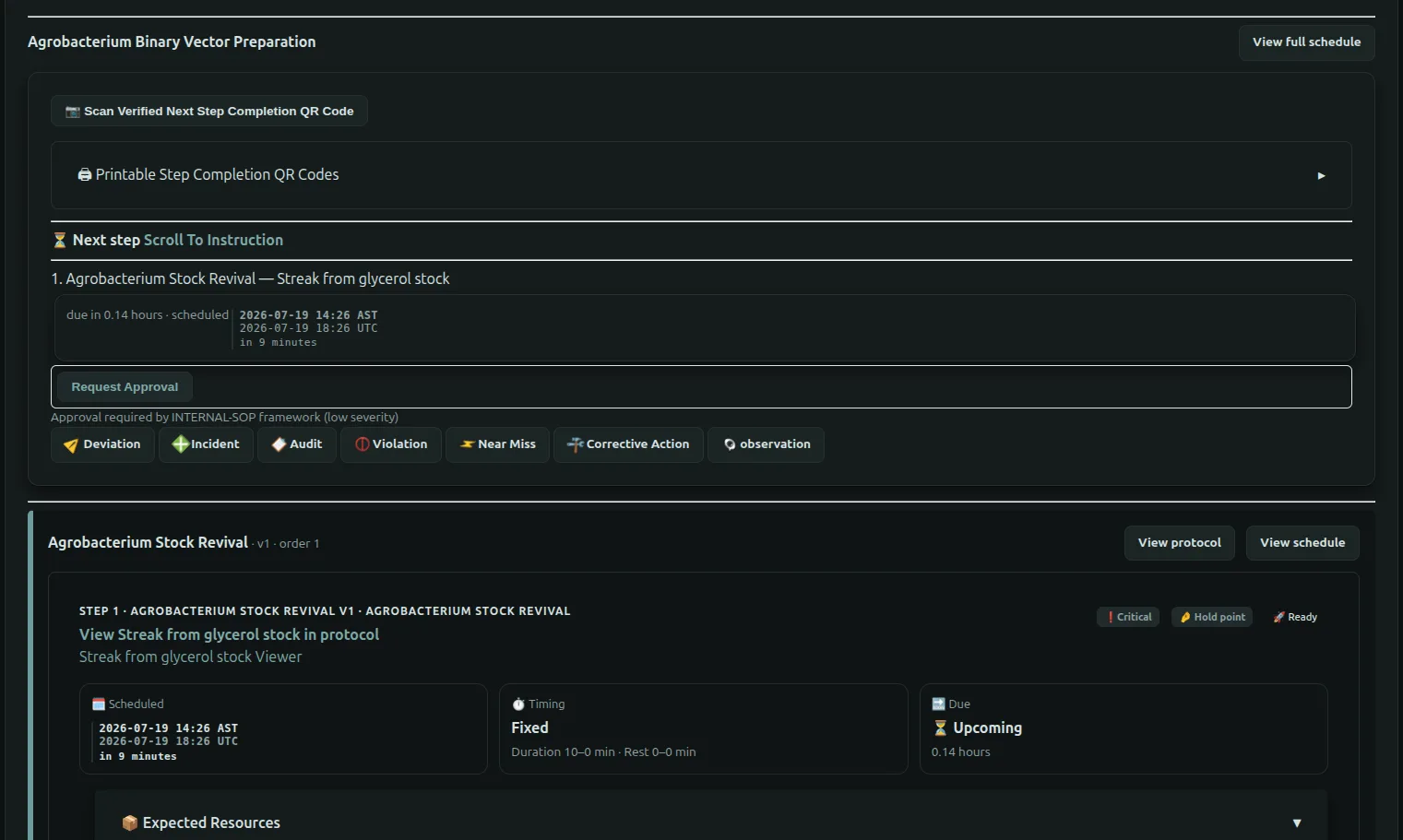
Once a batch or sample has been created, laboratory work is performed through the Run Sheet.
The Run Sheet presents every protocol and protocol step in execution order, calculates scheduling automatically, tracks workflow progress, records laboratory data, and maintains a complete audit trail of every action performed.
The operator's primary responsibilities are to:
- complete protocol steps
- record required laboratory data
- document observations
- report compliance events
- follow protocol instructions
- maintain accurate execution records
The operator experience is identical for both batches and samples.
The only difference is what the completed step affects:
- Batch execution applies the completed step to every active sample within the batch.
- Sample execution applies the completed step only to that individual sample.
Understanding the Run Sheet
The Run Sheet always presents the next work that should be completed.
flowchart LR
Progress["Workflow Progress"]
Progress --> Next["Current Step"]
Next --> Complete["Complete Step"]
Complete --> Data["Required Data Form"]
Data --> Following["Next Scheduled Step"]
At the top of the Run Sheet FlaskTrack displays:
- workflow progress
- completed step count
- completion percentage
- overdue work
- next scheduled step
Operators should normally complete work from top to bottom unless laboratory procedures require otherwise.
Protocols and Steps
Work is organized into protocols.
Each protocol contains one or more laboratory steps.
flowchart TB
Protocol
Protocol --> Step1["Step 1"]
Protocol --> Step2["Step 2"]
Protocol --> Step3["Step 3"]
Step1 --> Complete
Step2 --> Complete
Step3 --> Complete
Each step contains all information required to perform the laboratory procedure.
This includes:
- laboratory instructions
- expected outcome
- required ingredients
- required tools
- plasmids
- species requirements
- environmental conditions
- timing information
- scheduling status
- notes
Step Status
Every protocol step displays its current execution status.
Possible indicators include:
- Ready
- Completed
- Overdue
- Hold Point
- Critical
These indicators help operators quickly determine what requires immediate attention.
Critical and overdue steps should generally be addressed before continuing with later work.
Reviewing Step Information
Expanding a protocol step displays the complete laboratory instructions.
Operators should review:
- instructions
- expected outcome
- notes
- environmental conditions
- timing requirements
- required resources
Expected resources may include:
- ingredients
- tools
- plasmids
- species-specific materials
These resources are generated directly from the protocol definition and scaled automatically for the current execution.
Completing a Step
After completing the laboratory procedure, select Mark Step Complete.
flowchart LR
Read["Review Instructions"]
Read --> Perform["Perform Laboratory Work"]
Perform --> Complete["Mark Step Complete"]
Complete --> Form["Optional Data Collection"]
Form --> Audit["Audit Recorded"]
Audit --> Next["Next Step"]
Completing a step:
- records the completion time
- records the operator
- advances workflow progress
- updates scheduling
- evaluates workflow state transitions
- records audit history
For batch executions, completion applies to every active sample that is still participating in the workflow.
For sample executions, completion affects only the individual sample.
Data Collection Forms
Some protocol steps require laboratory data to be collected before completion.
When a step is completed, FlaskTrack may present one of three forms.
No Form
No additional information is required.
The step is immediately completed.
System Data Form
Certain workflow actions automatically present built-in laboratory forms.
Examples include:
- transfers
- inspections
- contamination
- harvest
- transformation
- rooting
These forms provide standardized data collection for common laboratory operations.
Custom Data Form
Protocol authors may define custom forms specifically for a protocol step.
These forms are completely configurable and may contain:
- text fields
- numbers
- measurements
- concentrations
- species
- plasmids
- dropdown selections
- dates
- booleans
- custom validation rules
The operator simply completes the requested information.
FlaskTrack validates every field before allowing the step to be completed.
Where Collected Data Goes
Every submitted form becomes part of the permanent execution record.
flowchart LR
Step["Complete Step"]
Step --> Form["Data Form"]
Form --> Event["Versioned Event"]
Event --> Parquet["Parquet Storage"]
Parquet --> Reports["Reports"]
Parquet --> Exports["Exports"]
Parquet --> Audit["Audit History"]
Collected data immediately becomes available throughout FlaskTrack, including:
- custom reports
- SQL reporting
- exports
- dashboards
- compliance records
- audit history
No additional synchronization or publishing is required.
Recording Compliance Events
Operators may create compliance events directly from any protocol step.
Available event types include:
- Observation
- Deviation
- Incident
- Audit
- Violation
- Near Miss
- Corrective Action
Creating an event automatically associates it with the current execution and protocol step.
This allows laboratories to document issues exactly where they occurred.
flowchart LR
Step
Step --> Observation
Step --> Deviation
Step --> Incident
Step --> Audit
Step --> Violation
Step --> CorrectiveAction
Observation --> Compliance["Compliance History"]
Deviation --> Compliance
Incident --> Compliance
Audit --> Compliance
Violation --> Compliance
CorrectiveAction --> Compliance
Each event records:
- event type
- severity
- description
- operator
- timestamp
- associated workflow entity
Scheduling
Every protocol step has an automatically calculated schedule.
Scheduling considers:
- workflow start time
- protocol delays
- previous protocol completion
- protocol step timing
- rest periods
Operators can view the complete execution schedule at any time.
FlaskTrack continuously updates due dates as work progresses.
QR Code Execution
Operators may also complete work using printed QR codes.
Scanning a verified step completion QR code opens the next required laboratory step directly, allowing work to continue without manually locating the protocol.
This is particularly useful for:
- production laboratories
- greenhouse work
- clean rooms
- laboratory benches
- mobile devices
Complete Laboratory Traceability
Every action performed through the Run Sheet becomes part of the permanent execution record.
flowchart LR
Operator
Operator --> Step
Step --> Data
Step --> Compliance
Step --> Audit
Data --> Reports
Compliance --> Reports
Audit --> Reports
By completing protocol steps through the Run Sheet, FlaskTrack automatically builds a complete history of laboratory execution, ensuring every observation, measurement, compliance event, and workflow transition remains fully traceable for reporting, regulatory review, and future analysis.