Add protocols to a workflow
A workflow becomes executable after reviewed protocol versions are added in the intended order.
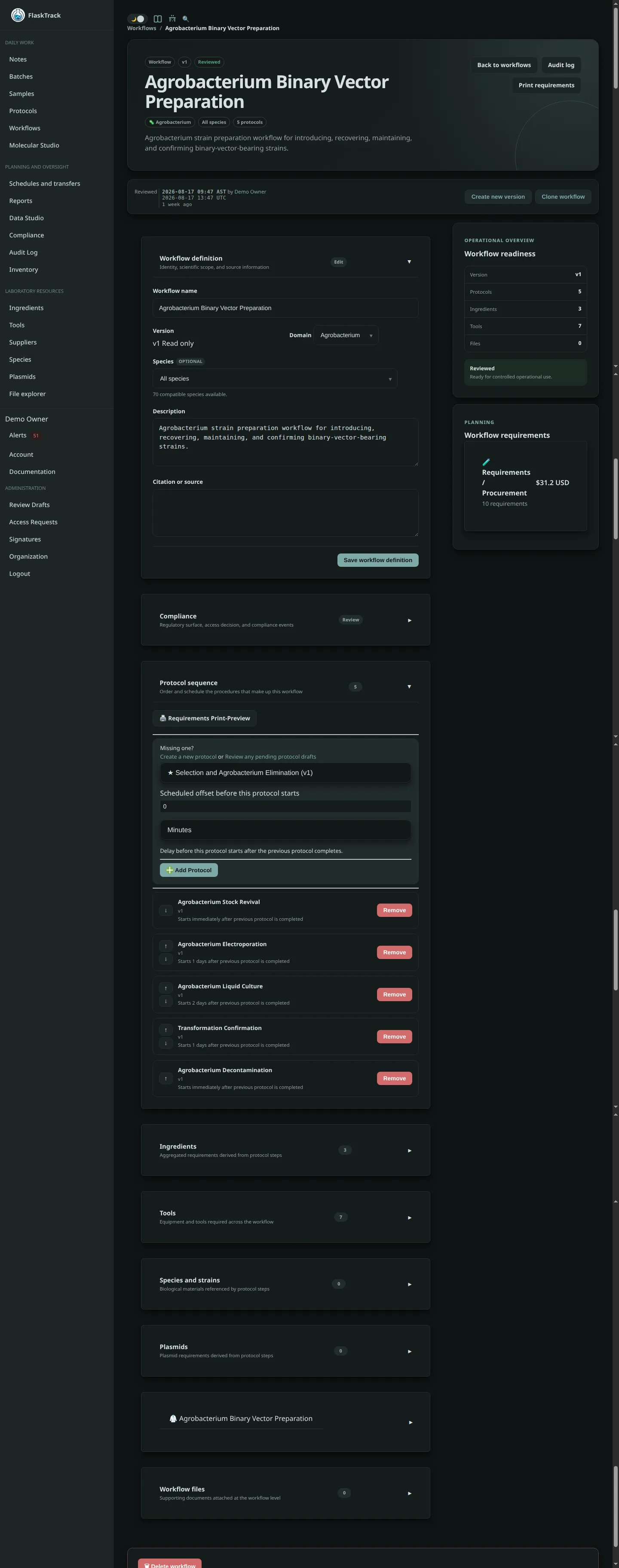
Add a protocol
- Open the draft workflow version.
- Select Add protocol.
- Choose the required protocol version.
- Enter the scheduled offset from workflow start.
- Save the relationship.
- Repeat for each protocol in the process.
Order and offsets
Protocol order communicates the process sequence. The scheduled offset controls when a protocol is expected to begin relative to the batch or sample workflow start.
An offset of 0 starts immediately. Later offsets should account for incubation, growth, transport, review, or other planned delay.
Review the schedule
Use workflow preview or a test execution to confirm:
- protocol order;
- selected versions;
- offsets and timezone behavior;
- gaps and overlaps;
- resource conflicts;
- expected completion window;
- alerts generated by the schedule.
Replace or remove a protocol
Changing protocol composition affects only the workflow version being edited. Create a new workflow version when changing a controlled or previously executed process.
Do not remove historical relationships from a version used by existing batches or samples.