icon file Flask Track Docs

Create a Protocol

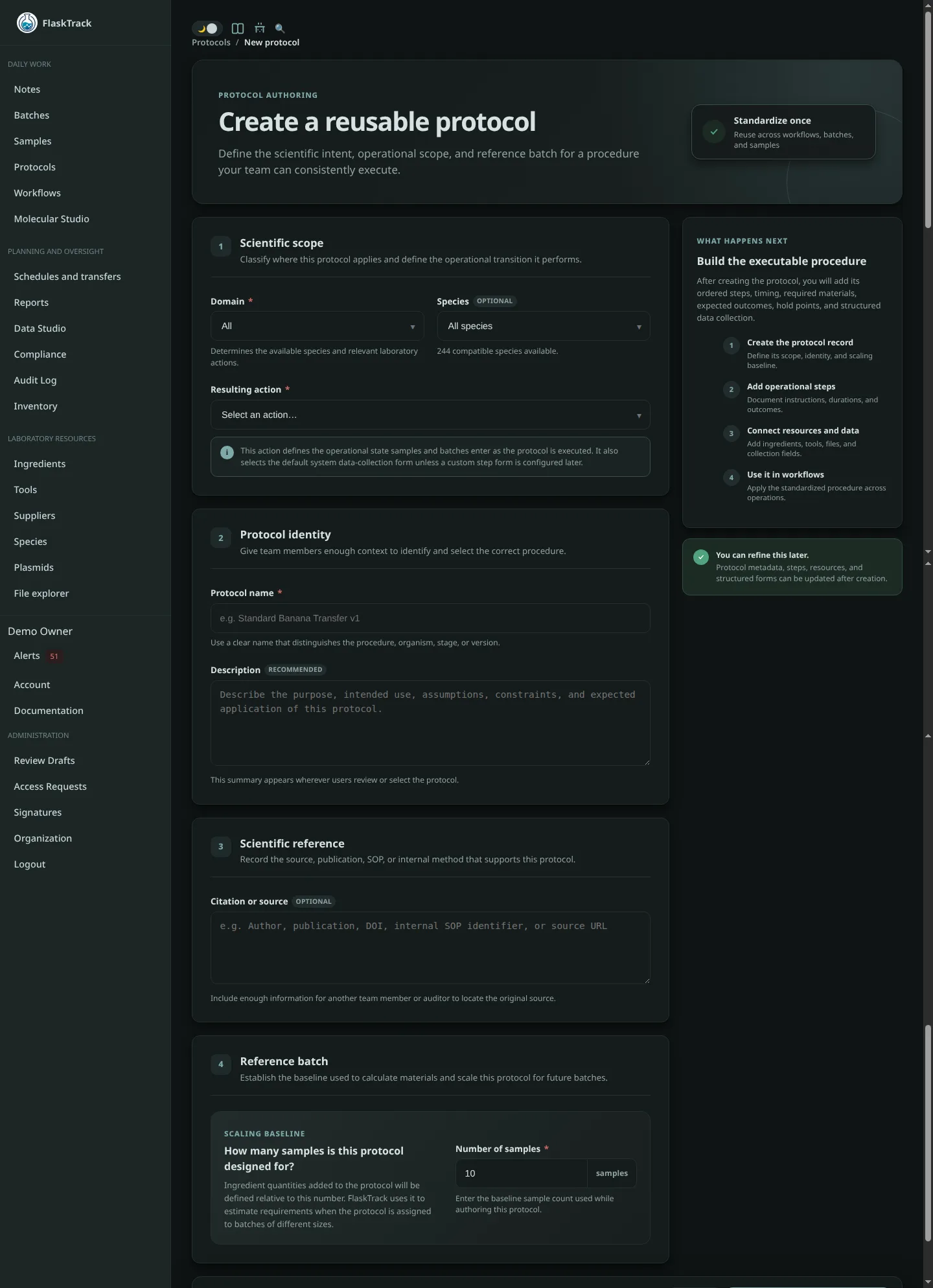
Protocols define reusable laboratory procedures that are executed as part of laboratory workflows. During workflow execution, protocols operate on batches and samples through a series of configurable protocol steps. A protocol consists of two major parts:

  1. Metadata — defines where and how the protocol is used.
  2. Steps — defines the laboratory workflow including instructions, required materials, data collection, scheduling, automation, validation, and execution behavior.

This page covers protocol metadata. Building the actual workflow is covered in the next section.


Metadata

Every protocol begins with metadata describing where the protocol fits within the laboratory workflow, what biological domain it supports, and how it behaves during execution. These settings determine where the protocol is available, which laboratory workflows it supports, how execution is tracked, and how requirements are calculated.


Domain

Select the laboratory domain this protocol belongs to.

Current domains include:

The selected domain determines which species are available for selection and filters protocol actions to those relevant for that laboratory discipline.

Tip

Organizing protocols into the correct domain keeps libraries manageable and improves reporting, searching, and protocol reuse.


Species

Select the species this protocol applies to.

Species are filtered by the selected domain.

Examples include:

Associating a protocol with a species allows FlaskTrack to present only relevant procedures during workflow execution.

Selecting All species creates a generic protocol that may be reused across every compatible species within the selected domain.


Action

Every protocol represents a workflow action. When the protocol completes, its action becomes the current reportable state of the associated batches and samples unless that state has already been advanced by one or more protocol step actions.

The selected action determines the reportable workflow state associated with the protocol, influences workflow reporting and analytics, and selects the default system data collection form presented during execution unless a custom step form overrides it.

Available actions include:

Action Typical Use
Initialize Create or begin a new workflow
Sterilize Sterilization of material or equipment
Transfer Move cultures or materials between media or containers
Inspection Record observations and quality checks
Quarantine Isolate material pending evaluation
Disposal Dispose of material
Mark Contaminated Record contamination events
Complete Successfully finish a workflow
Fail Record unsuccessful completion
Archive Move completed work into archive
Decontamination Decontaminate equipment or materials
Failure Analysis Investigate failed workflows
Subculture Subculture or passage cultures
Induce Rooting Begin rooting phase
Hardening Acclimatization or hardening-off
Inoculate Inoculate media or cultures
Expand Expand cultures or production
Fruit Fruiting stage for fungal workflows
Harvest Collect finished material
Preparation Prepare media, reagents, or equipment
Transformation Genetic transformation procedures
Co-cultivation Co-cultivation workflows
Regeneration Regenerate transformed material
Confirmation Verify successful outcomes
Selection Selection or screening procedures

Selecting the appropriate action improves:


Protocol Name

Provide a descriptive and versioned name.

Good examples include:

Avoid generic names such as:

Consistent naming conventions make protocols easier to search, maintain, and version over time.


Description

Describe what the protocol accomplishes and when it should be used.

Useful information includes:

Example:

Standard multiplication transfer protocol for Cavendish banana cultures using MS medium supplemented with BAP. Intended for healthy Stage II cultures transferred every four weeks under sterile conditions.

Clear descriptions help laboratory staff quickly determine whether a protocol is appropriate for a given workflow.


Citation

Optionally record references supporting the protocol.

This may include:

Recording references improves reproducibility, documentation quality, and regulatory compliance.


Protocol Reference Batch

Protocols define material requirements relative to a reference batch rather than fixed quantities.

Material requirements added throughout the protocol—including ingredients, plasmids, and other measured resources—are defined relative to a specified reference batch size. FlaskTrack automatically scales those requirements whenever the protocol is executed on a larger or smaller batch.

This allows a single protocol to accurately estimate:

without creating multiple versions of the same protocol.


Number of Samples

Specify how many samples the reference batch represents.

For example:

Reference Batch Meaning
10 Ingredient quantities are defined for 10 samples
25 Ingredient quantities are defined for 25 samples
100 Ingredient quantities are defined for 100 samples

When a protocol executes against a different batch size, FlaskTrack automatically scales every ingredient proportionally.

Example

A protocol is created using a reference batch of 10 samples.

During protocol design, one step specifies:

When the protocol is executed against 50 samples, FlaskTrack automatically scales the requirements to:

No manual calculations are required.


Create Protocol

Once the metadata has been completed, select Create Protocol And Start Adding Steps.

The protocol is created and the protocol editor opens, allowing you to begin defining the individual steps that make up this reusable laboratory procedure.

The next section covers creating protocol steps, including: