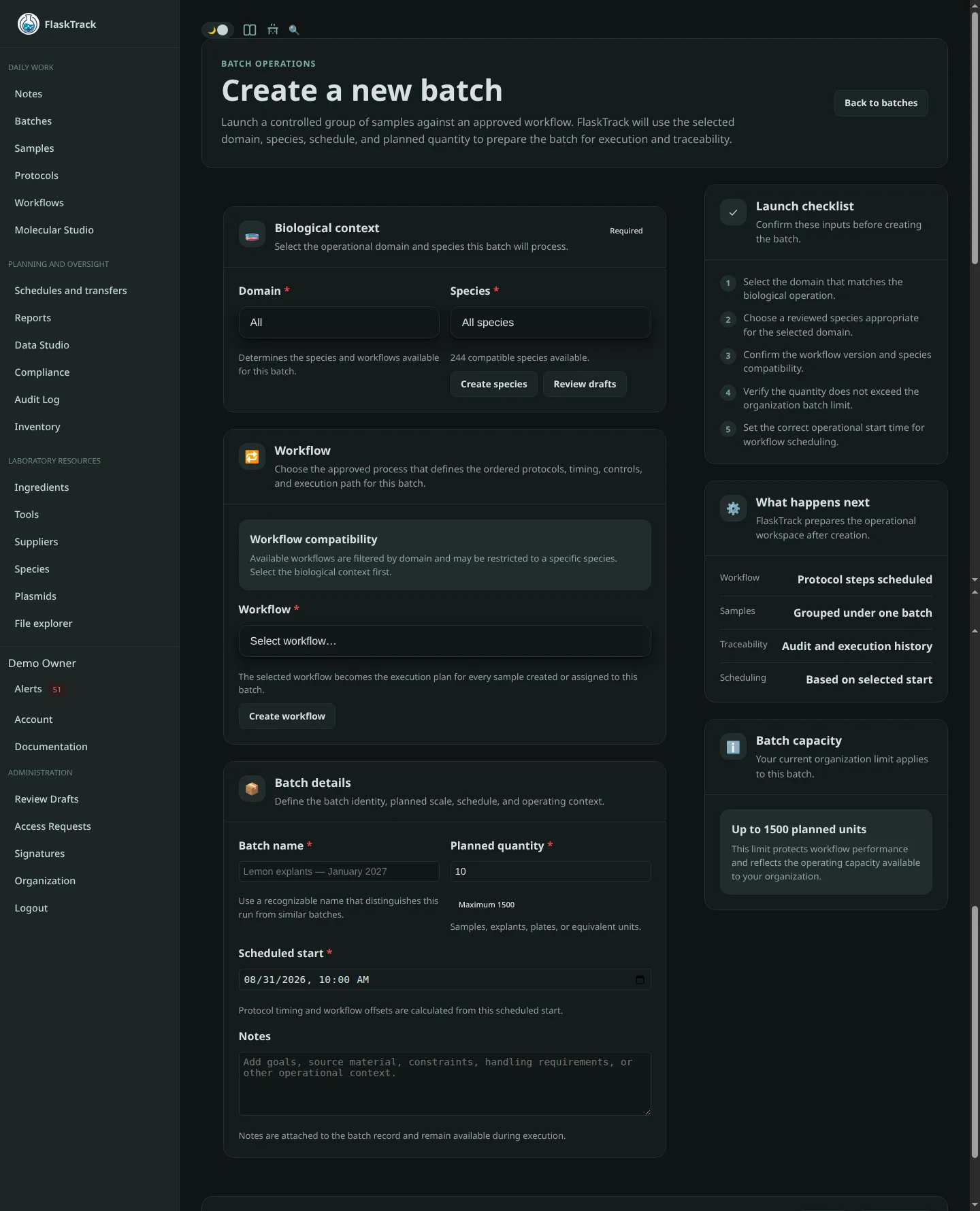
Create a Batch
A batch represents a single execution of a laboratory workflow.
Unlike workflows and protocols, which are reusable templates, a batch represents an individual laboratory production run, experiment, or cultivation process.
Each batch maintains its own:
- execution history
- collected laboratory data
- audit trail
- material consumption
- compliance records
- workflow progress
- sample lifecycle
A workflow may be executed an unlimited number of times by creating new batches.
Examples include:
- January 2026 Banana Explants
- Arabidopsis Transformation #42
- Oyster Mushroom Production Run 17
- Elite Clone Multiplication Batch
Relationship Between Workflows, Batches and Samples
A workflow defines how laboratory work is performed.
A batch represents one execution of that reusable workflow.
As the batch progresses through its ordered protocols, individual samples are created by promoting the batch through the workflow. Those promoted samples then become independently tracked laboratory objects while remaining associated with their originating batch.
flowchart TB
W["Reusable Workflow"]
W --> B["Batch Execution"]
B --> P["Ordered Protocols"]
P --> S["Promoted Samples"]
S --> S1["Sample 1"]
S --> S2["Sample 2"]
S --> S3["Sample n"]
This separation allows one reusable workflow to generate many independent batches, while each batch ultimately produces and manages its own collection of individually tracked samples.
Batch Planning
A batch begins as a planned production run.
During creation you specify the planned quantity, representing the number of samples you expect the workflow to ultimately produce.
This value is immediately used for:
- procurement estimation
- ingredient scaling
- production planning
- inventory forecasting
- scheduling
As the workflow executes, samples are promoted from the batch and individually tracked throughout the remainder of their lifecycle.
Creating a Batch
Select New Batch from the Batches page.
Creating a batch consists of selecting the reusable workflow to execute and providing basic execution information.
Required information includes:
- Domain
- Species
- Workflow
- Planned quantity
- Batch name
Optional information includes:
- Notes
- Scheduled start time
flowchart LR
Domain --> Species
Species --> Workflow
Workflow --> Quantity["Planned Quantity"]
Quantity --> Batch["Create Batch"]
Domain
Select the laboratory domain.
Examples include:
- Tissue Culture
- Fungus
- Agrobacterium
The selected domain filters both available species and compatible workflows.
Species
Select the species being processed.
Species are filtered by the selected domain.
Choosing a species automatically limits the available workflows to those compatible with that organism, helping prevent execution of incorrect laboratory procedures.
Workflow
Select the workflow the batch will execute.
The selected workflow determines:
- protocol execution order
- laboratory procedures
- required materials
- scheduling
- workflow state transitions
- procurement estimates
- data collection requirements
The workflow itself is never copied.
Instead, the batch becomes a live execution of that reusable workflow.
flowchart TB
Workflow["Reusable Workflow"]
Workflow --> Protocol1["Protocol 1"]
Workflow --> Protocol2["Protocol 2"]
Workflow --> Protocol3["Protocol 3"]
Batch["New Batch"]
Batch -. Executes .-> Workflow
The same workflow may therefore be executed hundreds or thousands of times while every batch maintains its own independent execution history.
Planned Quantity
The planned quantity represents the intended number of samples that this batch is expected to produce.
Although individual sample records do not necessarily exist immediately after the batch is created, this value allows FlaskTrack to estimate laboratory requirements before work begins.
FlaskTrack automatically uses the planned quantity to:
- scale protocol ingredient requirements
- estimate procurement
- calculate media preparation requirements
- estimate laboratory costs
- assist production planning
- estimate future sample production
Example
A workflow contains a protocol whose reference batch is defined for 10 samples.
That protocol requires:
- 500 mL media
- 20 g sucrose
- 8 g agar
Creating a batch with a planned quantity of 50 samples automatically scales every protocol requirement.
flowchart LR
A["Reference Batch<br/>10 Samples"]
A --> B["500 mL Media"]
A --> C["20 g Sucrose"]
A --> D["8 g Agar"]
B --> E["2.5 L Media"]
C --> F["100 g Sucrose"]
D --> G["40 g Agar"]
No manual calculations are required.
As the workflow progresses, protocols may promote the batch into individually tracked samples. These samples inherit their execution history while beginning their own independent laboratory lifecycle.
The actual number of samples may increase or decrease during execution as material is:
- promoted
- divided
- merged
- discarded
- harvested
- archived
For this reason, the planned quantity should be considered a planning estimate rather than a fixed limit.
Batch Name
Provide a descriptive name for the production run.
Examples include:
- Banana Explants — January 2026
- Generation 3 Multiplication
- Arabidopsis Transformation Run 18
- Spawn Production Batch 4
Good naming conventions make batches easier to identify throughout reporting and audit history.
Notes
Optionally record information specific to this execution.
Examples include:
- project objectives
- experimental conditions
- customer information
- operator instructions
- observations prior to execution
- laboratory constraints
Unlike workflow descriptions, these notes apply only to this individual batch.
Scheduled For
Specify when execution is expected to begin.
Scheduling allows FlaskTrack to:
- plan laboratory workloads
- calculate protocol due dates
- schedule protocol delays
- generate upcoming work alerts
- assist production planning
The scheduled start time becomes the reference point for protocol scheduling throughout the workflow.
Batch Execution
After selecting Create Batch, FlaskTrack creates a new execution of the selected workflow.
The batch immediately inherits:
- ordered protocols
- protocol steps
- scheduling rules
- laboratory instructions
- material requirements
- environmental requirements
- custom data collection forms
- workflow state transitions
As protocols are completed, the workflow gradually promotes work into individually tracked samples.
flowchart LR
Batch
--> Workflow
Workflow
--> Protocols
Protocols
--> Promotion["Sample Promotion"]
Promotion
--> Samples["Tracked Samples"]
Samples
--> Reports["Reporting & Analytics"]
From this point forward:
- the batch represents the production run as a whole
- each sample records its own laboratory history, protocol progress, notes, compliance events, attachments, and collected data
Completing protocols, recording laboratory data, consuming materials, promoting samples, or generating compliance events affects only this batch and its associated samples. The underlying reusable workflow remains unchanged.
flowchart LR
W["Reusable Workflow"]
W --> P1["Protocol 1"]
P1 --> P2["Protocol 2"]
P2 --> P3["Protocol 3"]
W -. creates execution .-> B["Batch"]
B --> S1["Sample 1"]
B --> S2["Sample 2"]
B --> S3["Sample 3"]
B -. executes .-> P1
P1 -. affects .-> S1
P1 -. affects .-> S2
P1 -. affects .-> S3
P2 -. affects .-> S1
P2 -. affects .-> S2
P2 -. affects .-> S3
P3 -. affects .-> S1
P3 -. affects .-> S2
P3 -. affects .-> S3
Reusing Workflows
One workflow may produce thousands of batches over its lifetime.
flowchart TB
Workflow["Banana Micropropagation Workflow"]
Workflow --> Jan["January Production"]
Workflow --> Feb["February Production"]
Workflow --> Mar["March Production"]
Workflow --> Trial["Research Trial"]
Workflow --> Elite["Elite Clone"]
Workflow --> Customer["Customer Order"]
Jan --> H1["Independent Batch History"]
Feb --> H2["Independent Batch History"]
Mar --> H3["Independent Batch History"]
Trial --> H4["Independent Batch History"]
Elite --> H5["Independent Batch History"]
Customer --> H6["Independent Batch History"]
Every batch follows the same standardized laboratory process while maintaining its own execution history, promoted samples, laboratory data, and audit trail.
This separation between reusable workflows and individual batch executions allows laboratories to continuously improve standardized procedures without sacrificing traceability, reproducibility, or regulatory compliance.