icon file Flask Track Docs

Create a New Species

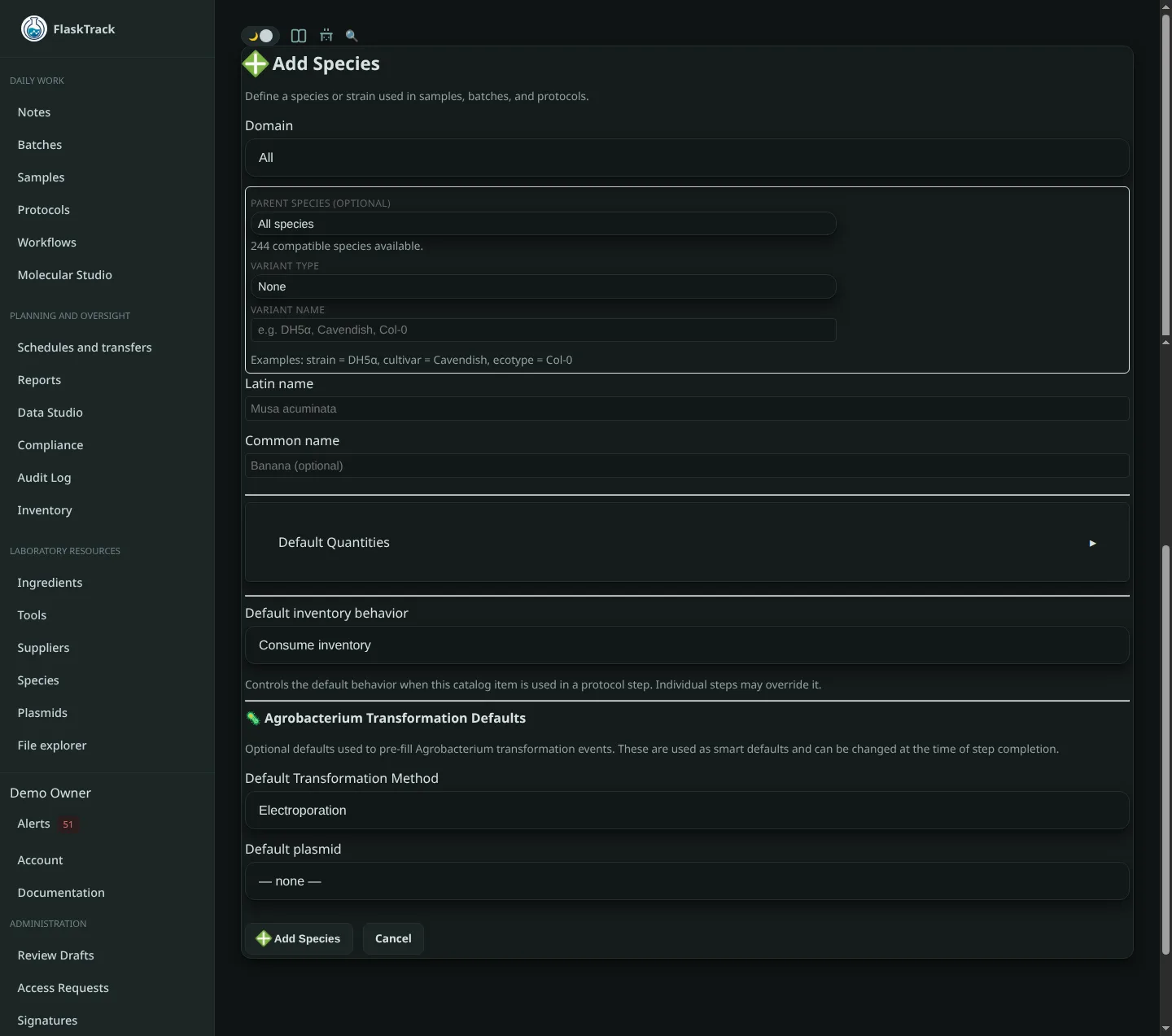
Species define the biological organisms, strains, cultivars, or variants used throughout FlaskTrack. Species can be referenced by samples, batches, protocols, and transformation workflows. Defining species allows protocols to automatically populate common preparation values while ensuring consistent reporting across the organization.


Domain Selection

The Domain determines which biological category the species belongs to. Domains organize species throughout the application and may enable domain-specific fields or workflow defaults.

Available domains include:

Changing the domain filters the available parent species and helps organize species catalogs.


Parent Species (Optional)

Species may optionally inherit from another species.

For example:

Inheritance allows organizations to maintain clean taxonomic relationships while distinguishing laboratory variants.


Variant Type

If this species is derived from another species, select the appropriate variant classification.

Available types include:

The selected type determines how the variant is described throughout FlaskTrack.


Variant Name

The specific identifier for the selected variant.

Examples:

Variant Type Example
Strain DH5α
Cultivar Cavendish
Ecotype Col-0
Line Columbia-0
Hybrid F1 Hybrid
Subspecies indica

Latin Name

Enter the scientific taxonomic name.

Examples:

Scientific names are used throughout reports, labels, and protocol documentation.


Common Name

(Optional)

A human-readable common name.

Examples:

The common name is displayed throughout the user interface where appropriate.


Default Protocol Usage

These values act as organizational defaults whenever this species is added to a protocol. Individual protocol steps may override these values without modifying the catalog entry.


Default Amount

Defines the typical quantity used whenever this species is inserted into a protocol.

Specify:

Examples:

This value is only a default and may be adjusted for individual protocol steps.


Default Concentration

Defines the normal stock or working concentration associated with this species.

Specify:

FlaskTrack supports compound concentration units consisting of:

Examples include:

These defaults automatically populate protocol steps while remaining fully editable.


Agrobacterium Transformation Defaults

For Agrobacterium species, transformation defaults can be stored to reduce repetitive data entry during protocol execution.

These settings provide intelligent defaults when transformation events are recorded but may always be modified during protocol execution.


Default Transformation Method

Select the transformation method most commonly used for this species.

Supported methods include:

This value is automatically pre-filled whenever an Agrobacterium transformation event is created.


Default Plasmid

(Optional)

Select the plasmid most frequently used with this species.

If configured, FlaskTrack will automatically preselect the plasmid during transformation events while still allowing users to choose another plasmid if necessary.


Creating the Species

After completing the required fields, select Add Species to create the catalog entry.

Once created, the species becomes available throughout FlaskTrack for:

Catalog defaults can be edited at any time without affecting historical protocol execution records.