Install and run the Instrument Agent
The FlaskTrack Instrument Agent is the bridge between a cloud-hosted FlaskTrack deployment and instruments or files that are only reachable inside a laboratory network.
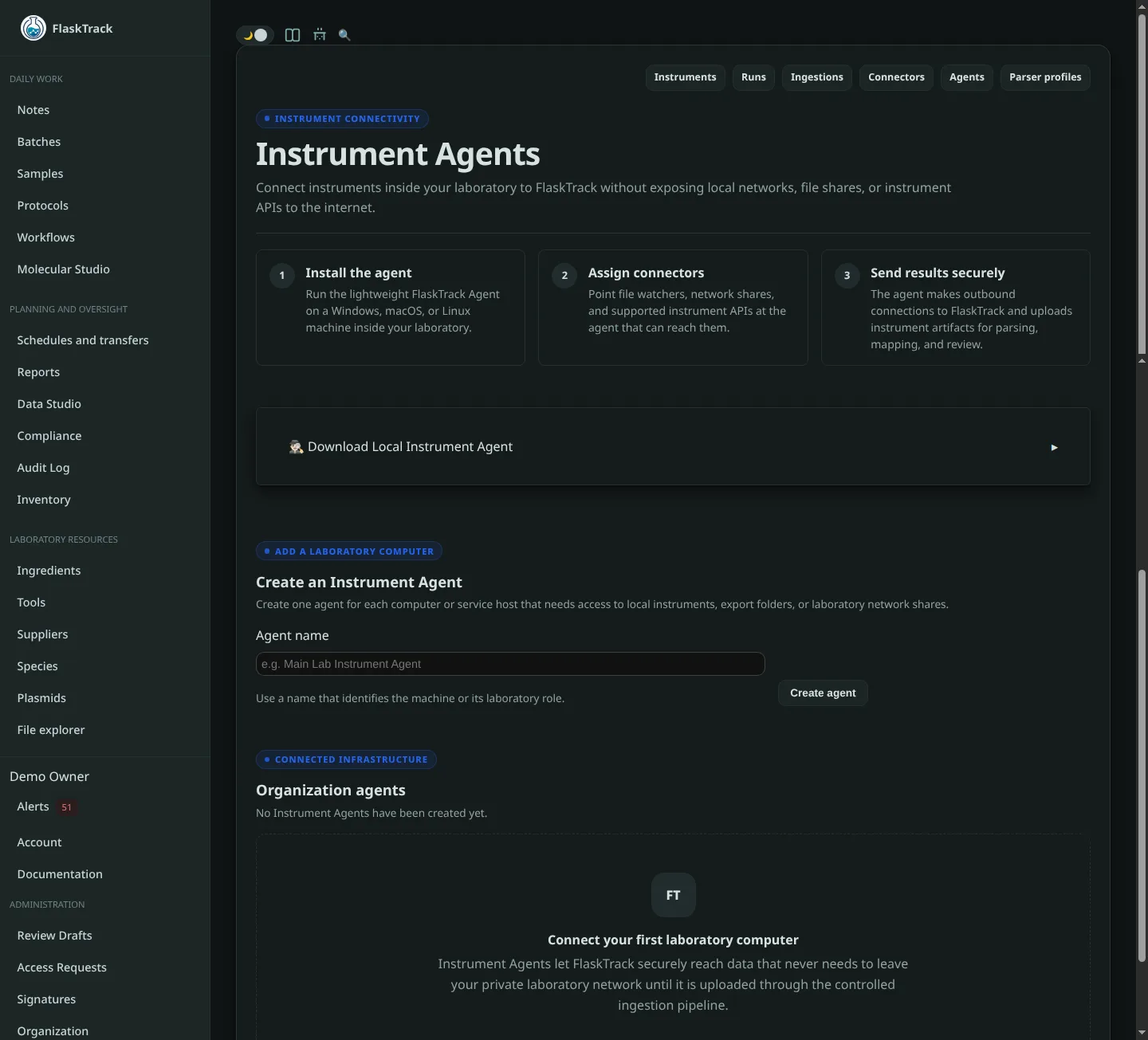
It is designed to run continuously on Windows, Linux, or macOS with a small local footprint.
What the agent does
The agent can:
- retrieve assigned connector configuration from FlaskTrack;
- monitor local directories;
- monitor directories provided by mounted network shares;
- poll supported local vendor APIs such as Opentrons;
- wait for result files to become stable before reading them;
- calculate SHA-256 fingerprints;
- stage artifacts in a durable local spool;
- upload artifacts to FlaskTrack using outbound HTTP(S);
- retry temporary network failures;
- report its hostname, operating system, architecture, version, capabilities, and connector health to FlaskTrack.
The agent does not require FlaskTrack to open an inbound connection into the laboratory.
Network requirements
For FlaskTrack SaaS, the agent needs outbound HTTPS access to your FlaskTrack deployment.
Typical topology:
For an Opentrons connector:
The Opentrons device itself does not need to be exposed to the public internet.
Create the agent in FlaskTrack
Before installing the binary:
- Open your organization in FlaskTrack.
- Open Instrument Agents.
- Create an agent.
- Give it a recognizable machine or role name.
- Copy the generated
ftia_...key.
The key authenticates that installed agent to your organization.
Protect the agent key
Anyone with a valid agent key may be able to submit instrument data within the scope allowed to that agent. Store the key as a machine secret.
Obtain the binary
Use the FlaskTrack Instrument Agent binary supplied by your FlaskTrack administrator or your organization's approved FlaskTrack release package.
Choose the build for the machine that will run it:
- Linux x86-64;
- Windows x86-64;
- macOS x86-64;
- macOS Apple Silicon, where provided.
For source deployments, the project can also be built with Rust using:
The resulting executable is:
or on Windows:
Initialize the agent
The agent's bootstrap configuration contains only the FlaskTrack server address, the machine credential, and local state information. Instrument paths and connector settings are retrieved from FlaskTrack.
Production example
flasktrack-agent init \
  --url https://flasktrack.com \
  --key ftia_REPLACE_WITH_YOUR_KEY \
  --config ./agent.json
Keep the key outside the configuration file
If your environment provides secrets through environment variables or another service manager, initialize without storing the key:
export FLASKTRACK_AGENT_KEY='ftia_REPLACE_WITH_YOUR_KEY'

flasktrack-agent init \
  --url https://flasktrack.com \
  --no-store-key \
  --config ./agent.json
The agent recognizes these environment variables:
Local configuration
A normal configuration looks like:
{
  "server_url": "https://flasktrack.com",
  "agent_key": "ftia_REPLACE_WITH_YOUR_KEY",
  "state_dir": "/var/lib/flasktrack-agent",
  "request_timeout_seconds": 90,
  "allow_insecure_http": false
}
state_dir stores the configuration cache, upload spool, dead-letter records, and agent log.
Validate the installation
Run:
doctor verifies that:
- the agent key authenticates;
- FlaskTrack returns configuration for the correct agent;
- assigned file paths are accessible;
- supported local devices such as Opentrons respond.
Run this command again after changing local mounts, permissions, or network configuration.
Run one pass
For installation testing:
This performs a single controlled processing pass rather than running forever.
Run in the foreground
Foreground mode is useful during initial setup because the agent reports configuration, staging, upload, and connectivity events directly in the terminal.
Linux installation
A normal service deployment uses systemd.
Recommended paths
Executable: /usr/local/bin/flasktrack-agent
Config:     /etc/flasktrack-agent/agent.json
State:      /var/lib/flasktrack-agent
Set the local configuration state directory accordingly:
Install with the supplied script
From the Instrument Agent project directory:
cargo build --release

sudo ./scripts/install-linux.sh \
  ./target/release/flasktrack-agent \
  ./agent.json
The supplied service configuration runs the agent under a dedicated flasktrack-agent system account.
Check status
Follow service logs:
The agent also maintains its own agent.log under the configured state directory.
Restart after machine-level changes
Network shares used by connectors should be mounted before the agent service starts.
Windows installation
The supplied Windows installer runs the same agent executable as an AtStartup task under SYSTEM.
Initialize before installing
From PowerShell:
.\flasktrack-agent.exe init `
  --url https://flasktrack.com `
  --key ftia_REPLACE_WITH_YOUR_KEY `
  --config .\agent.json
Test it:
Install
Run an elevated PowerShell:
.\packaging\windows\install-agent.ps1 `
  -Binary .\target\release\flasktrack-agent.exe `
  -Config .\agent.json
The supplied installer uses:
for the installed binary, configuration, and state directory.
Important Windows share behavior
The scheduled agent runs as SYSTEM. A drive letter mapped in your interactive user session, such as Z:, may not exist for the SYSTEM account.
For network shares, prefer a UNC path when the service account can access it:
Alternatively, run the agent under an approved service identity that has access to the share.
Always verify the final service account with:
macOS installation
The supplied macOS configuration uses launchd.
Initialize and test
./flasktrack-agent init \
  --url https://flasktrack.com \
  --key ftia_REPLACE_WITH_YOUR_KEY \
  --config ./agent.json

./flasktrack-agent doctor --config ./agent.json
Install
The launch daemon uses the system FlaskTrack application-support directory for its configuration.
Local state and logs
Confirm that the configured state directory is writable by the account running the launch daemon. The agent's own log is stored as agent.log in the state directory; the supplied launchd configuration also directs process output to FlaskTrack Agent log files under /Library/Logs.
Remote configuration
The agent periodically asks FlaskTrack for the connectors assigned to it.
This means you do not edit the local agent.json when changing:
- watch paths;
- file patterns;
- parser settings;
- instrument assignment;
- polling intervals;
- Opentrons URLs.
Change those settings in FlaskTrack. The agent will receive the updated configuration during its normal refresh cycle.
Configuration cache
The latest successful remote configuration is cached locally.
If FlaskTrack is temporarily unreachable, the daemon can continue operating against its last known configuration and can stage data locally until connectivity returns.
Local spool
Before an eligible source file is uploaded, the agent copies it into its local spool and calculates its SHA-256 fingerprint.
Typical state layout:
state/
├── spool/
├── dead-letter/
├── remote-config.json
├── uploaded.log
├── seen-files.log
└── agent.log
Temporary connectivity problems are retried. Artifacts that receive a permanent API rejection are retained in dead-letter for investigation instead of being retried indefinitely.
Agent key rotation
If an agent key must be replaced:
- Open Instrument Agents in FlaskTrack.
- Rotate the key for the affected agent.
- Copy the newly generated key.
- Update the machine secret or
agent.json. - Restart the agent process.
- Run
flasktrack-agent doctor.
The previous credential should no longer be used after rotation.
Revoking an agent
Revoke an agent when a workstation is retired, compromised, replaced, or should no longer submit instrument data.
After revocation, the installed daemon will no longer authenticate successfully. Remove or disable the local daemon and protect or remove any remaining configuration and spool data according to your organization's retention procedures.