Sequences and versions
Sequences are the core design artifacts in Molecular Studio.
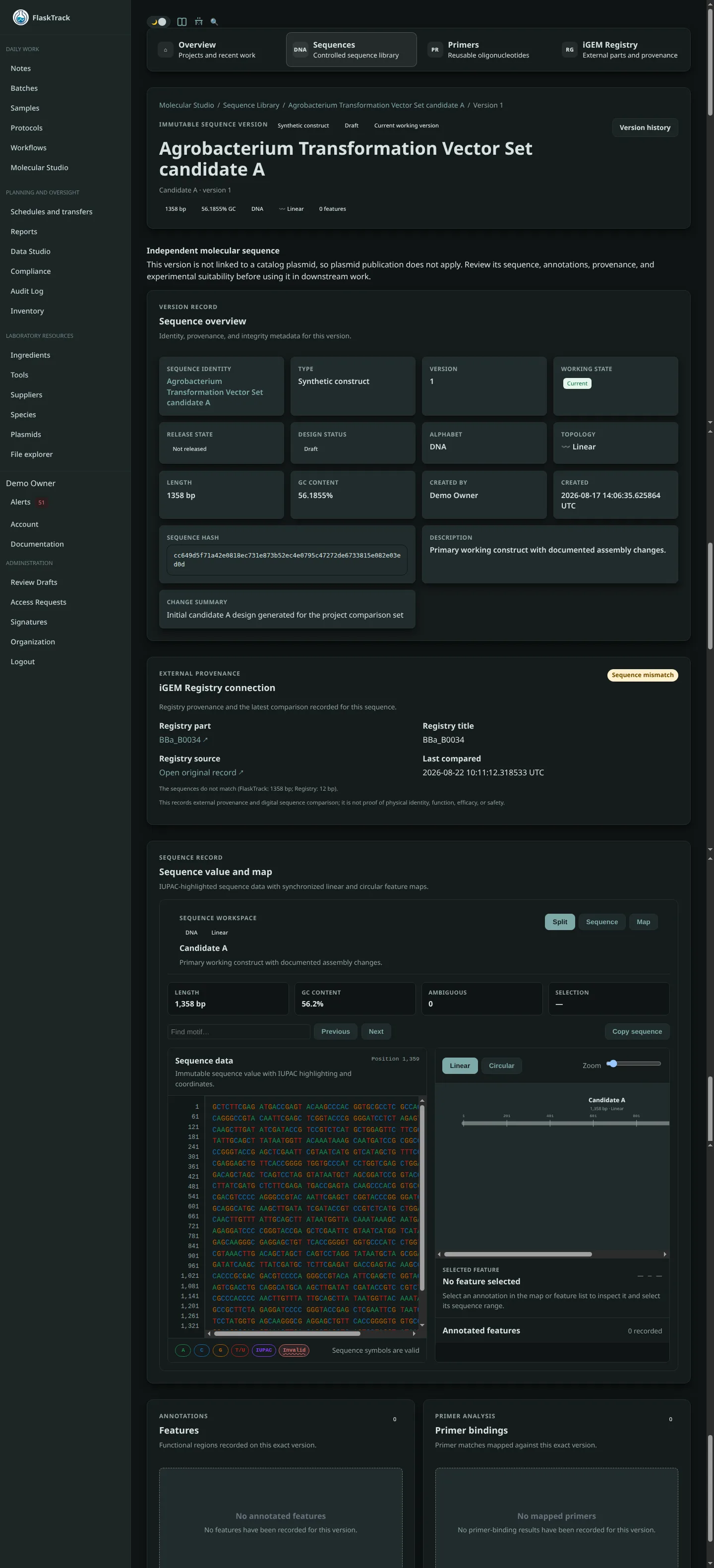
A sequence record represents a durable molecular identity. Versions preserve the exact content used at different points in the design history.
Why versions matter
Do not overwrite an approved or historically important sequence.
A versioned history allows FlaskTrack to answer:
- What sequence existed at a particular point in time?
- Which version was used in an assembly?
- Which version did a primer bind to?
- Which version was reviewed?
- Which exact version was released?
Creating a sequence
Choose Create sequence when entering sequence data manually.
Typical fields include name, sequence type, alphabet, topology, sequence, description, project role, and change summary.
Importing a sequence
Use Import sequence for FASTA, GenBank, or plain nucleotide data.
When both a file and pasted sequence data are provided, the selected file is treated as the import source.
Review imported annotations and metadata before relying on them operationally.
Copying an existing sequence
Use Copy from existing when you want to create project work from an existing sequence while preserving the original record.
This is useful for modifying a released construct, creating a derivative design, using an established sequence as a source, or preserving provenance between related designs.
Current versus released
A current version is the version presently being worked with in its design history.
A released version is the version explicitly approved for operational use.
These are not interchangeable.
A newer draft can exist while an older approved version remains released in the catalog.
Sequence integrity
FlaskTrack stores sequence-derived metadata such as normalized sequence, sequence length, sequence hash, and topology.
Release validates that the stored sequence still agrees with its derived metadata.