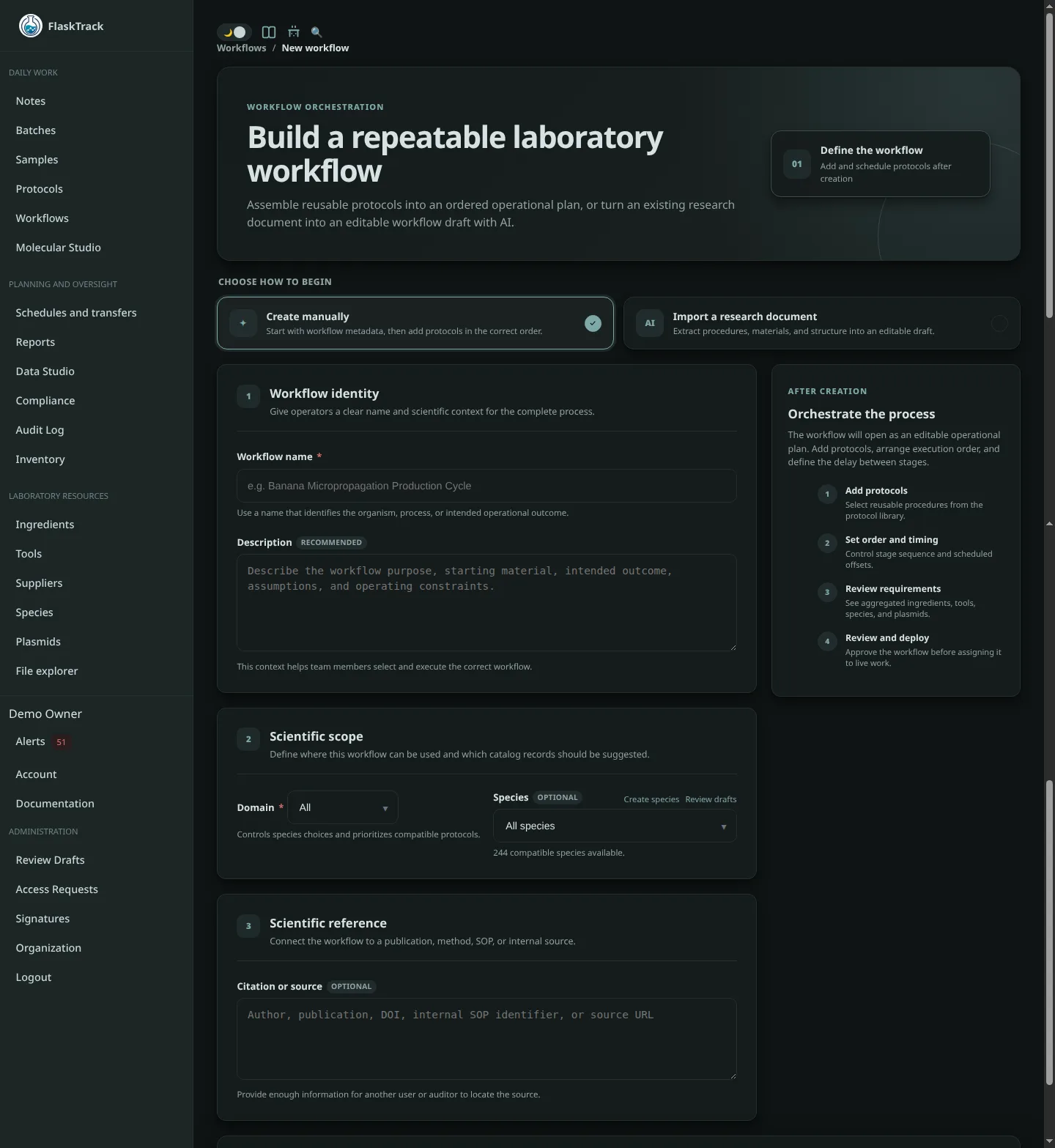
Create a Workflow
A workflow defines a complete, reusable laboratory process.
Rather than describing a single experiment or production run, a workflow represents the standardized sequence of laboratory procedures used to move batches and samples through their entire lifecycle.
Once created, a workflow can be executed repeatedly across an unlimited number of batches and samples while maintaining consistent procedures, traceability, and reporting.
Workflows are composed of reusable protocols, allowing laboratories to standardize common procedures while avoiding duplicated configuration.
Examples include:
- Banana Micropropagation
- Agrobacterium Transformation
- Oyster Mushroom Production
- DNA Extraction
- Cell Culture Expansion
Because workflows are reusable, they can be cloned, refined, versioned, and adapted for new species, cultivars, or research programs without rebuilding every protocol from scratch.
Workflow Structure
FlaskTrack organizes laboratory procedures into three reusable layers.
flowchart TB
W["Banana Micropropagation Workflow"]
W --> P1["Media Preparation"]
W --> P2["Culture Transfer"]
W --> P3["Root Induction"]
P1 --> S11["Prepare Medium"]
P1 --> S12["Sterilize"]
P2 --> S21["Transfer Explants"]
P2 --> S22["Inspection"]
P3 --> S31["Prepare Rooting Media"]
P3 --> S32["Transfer"]
P3 --> S33["Record Observations"]
Each layer has a distinct responsibility.
| Component | Purpose |
|---|---|
| Workflow | Defines the complete laboratory lifecycle by arranging protocols into their execution order. |
| Protocol | Defines a reusable laboratory procedure that performs one stage of the workflow. |
| Protocol Step | Defines the individual laboratory operations, materials, instructions, and data collected during a protocol. |
This separation allows laboratories to build complex workflows from smaller reusable components.
For example, a single Transfer Protocol may be shared by dozens of workflows, while a workflow can easily be cloned and modified to create a new production process without changing the original.
Creating a Workflow
Select New Workflow from the Workflows page.
Workflows may be created in one of two ways:
- Create manually
- Import from document (AI)
Both methods produce a fully reusable workflow that can be executed against any number of compatible batches and samples.
Create Manually
Manual workflow creation begins by defining the workflow metadata.
Provide:
- Workflow name
- Domain
- Species
- Description
- Citation
After the workflow has been created, reusable protocols are added and arranged into their execution order.
Because workflows reference reusable protocols rather than embedding them directly, they are easy to maintain, duplicate, and customize for new laboratory processes.
Workflow Name
Choose a descriptive name representing the complete laboratory process.
Examples include:
- Cavendish Banana Micropropagation
- Oyster Mushroom Production
- Agrobacterium Leaf Disc Transformation
- Arabidopsis Stable Transformation
The workflow name appears throughout execution, reporting, dashboards, and audit history.
Domain
Select the laboratory domain the workflow belongs to.
Examples include:
- Tissue Culture
- Fungus
- Agrobacterium
The selected domain determines which species and protocols are available for inclusion.
Species
Select the species this workflow supports.
Species filtering helps ensure only compatible protocols are available when building the workflow and when executing it against batches or samples.
Description
Describe the overall laboratory process and intended use of the workflow.
Typical information includes:
- biological objective
- laboratory scope
- intended production process
- assumptions
- special considerations
- expected outcome
Citation
Optionally record publications, SOPs, laboratory manuals, or other references used to develop the workflow.
Maintaining citations improves long-term traceability, reproducibility, and regulatory documentation.
Import from Document (AI)
Instead of building a workflow manually, FlaskTrack can generate one directly from existing laboratory documentation using your organization's configured AI provider.
Supported source material includes:
- Standard Operating Procedures (SOPs)
- Laboratory protocols
- Scientific publications
- Internal documentation
- PDF documents
- Word documents
- Plain text
The AI analyzes the supplied documentation and generates:
- workflow metadata
- reusable protocols
- protocol steps
- laboratory instructions
- material requirements
- environmental conditions
- execution timing
- custom data collection forms
The generated workflow can then be reviewed, edited, expanded, and reused just like any manually created workflow.
Important
AI-generated workflows are intended to accelerate workflow development. All generated workflows, protocols, and laboratory instructions should be reviewed and validated before being used in production.
Save and Continue
Selecting Save & Continue to Protocols creates the workflow.
You will then be taken to the workflow editor where reusable protocols can be added, reordered, cloned, and configured to build the complete laboratory process.
Once complete, the workflow can be executed repeatedly across an unlimited number of compatible batches and samples, providing a standardized, reproducible laboratory process that can continue to evolve over time without requiring individual experiments to be rebuilt.
Editing the Workflow
After creating a workflow, the workflow editor allows you to manage both its metadata and the reusable protocols that make up the laboratory process.
Unlike traditional laboratory systems where procedures are duplicated into every workflow, FlaskTrack workflows reference reusable protocols. This allows a protocol to be maintained once and reused across many workflows.
The workflow editor provides tools to:
- edit workflow metadata
- add existing protocols
- remove protocols
- reorder protocol execution
- schedule delays between protocols
- clone workflows
- review audit history
- estimate procurement requirements
Workflow Metadata
The workflow metadata can be updated at any time.
Changes include:
- workflow name
- domain
- species
- description
- citations
Updating workflow metadata does not modify the protocols contained within the workflow.
Adding Protocols
Protocols are added one at a time using Add Protocol.
Only protocols compatible with the selected domain and species are available.
Each protocol remains an independent reusable object. Adding a protocol to a workflow creates a reference to that protocol rather than copying it into the workflow.
This allows a single protocol to be shared across many different laboratory workflows.
For example, a Media Preparation protocol might be used by:
- Banana Micropropagation
- Orchid Tissue Culture
- Agrobacterium Transformation
- Mushroom Cultivation
without maintaining four separate copies.
Protocol Ordering
Protocols execute in the order shown within the workflow.
The execution order represents the complete laboratory lifecycle.
Example:
flowchart TB
A["Media Preparation"]
B["Culture Initiation"]
C["Multiplication"]
D["Root Induction"]
E["Hardening"]
F["Harvest"]
A --> B
B --> C
C --> D
D --> E
E --> F
Changing the order does not modify the protocol itself—it only changes where that protocol appears within this workflow.
Scheduled Delays
Each protocol may optionally define a delay before it begins.
Delays are measured relative to the completion of the previous protocol.
For example:
| Protocol | Delay |
|---|---|
| Prepare Media | Immediately |
| Inoculate Cultures | Immediately |
| Inspection | 7 days |
| Subculture | 28 days |
| Root Induction | 21 days |
These delays help construct long-running laboratory workflows that span days, weeks, or months.
During execution, FlaskTrack uses these values to calculate expected protocol schedules and upcoming work.
Procurement Preview
Because every protocol contains structured material requirements, FlaskTrack automatically aggregates those requirements across the entire workflow.
The procurement preview provides an estimate of:
- required ingredients
- laboratory tools
- plasmids
- biological materials
- estimated inventory consumption
- procurement needs
All calculations automatically scale based on the batch size used during execution.
This provides laboratories with an accurate estimate of resource requirements before work begins.
Cloning Workflows
Workflows are intended to evolve over time.
Instead of modifying an existing production workflow, laboratories can clone an existing workflow and adapt it for a new process.
Common examples include:
- adapting a workflow to another species
- creating an improved version
- testing a new production method
- supporting different laboratory facilities
- creating customer-specific workflows
Because workflows reference reusable protocols, only the protocols that actually require modification need to be cloned or replaced.
This significantly reduces maintenance compared to systems where every workflow contains duplicated procedures.
Audit History
Every workflow maintains a complete audit history.
Changes to workflow metadata, protocol ordering, and workflow configuration are recorded and available through the audit log.
This provides traceability for workflow development while supporting regulated laboratory environments.
Reusable Laboratory Processes
Once complete, a workflow becomes a reusable laboratory process that can be executed repeatedly against any compatible batches or samples.
Each execution uses the same ordered collection of protocols while independently recording:
- execution history
- operator activity
- collected data
- material usage
- compliance events
- audit records
This allows laboratories to continuously improve workflows while preserving complete traceability for every execution.
sequenceDiagram
participant User
participant Batch
participant Workflow
participant Protocol
User->>Batch: Start batch
Batch->>Workflow: Load workflow
Workflow->>Protocol: Execute Protocol 1
Protocol-->>Workflow: Complete
Workflow->>Protocol: Execute Protocol 2
Protocol-->>Workflow: Complete
Workflow->>Protocol: Execute Protocol 3