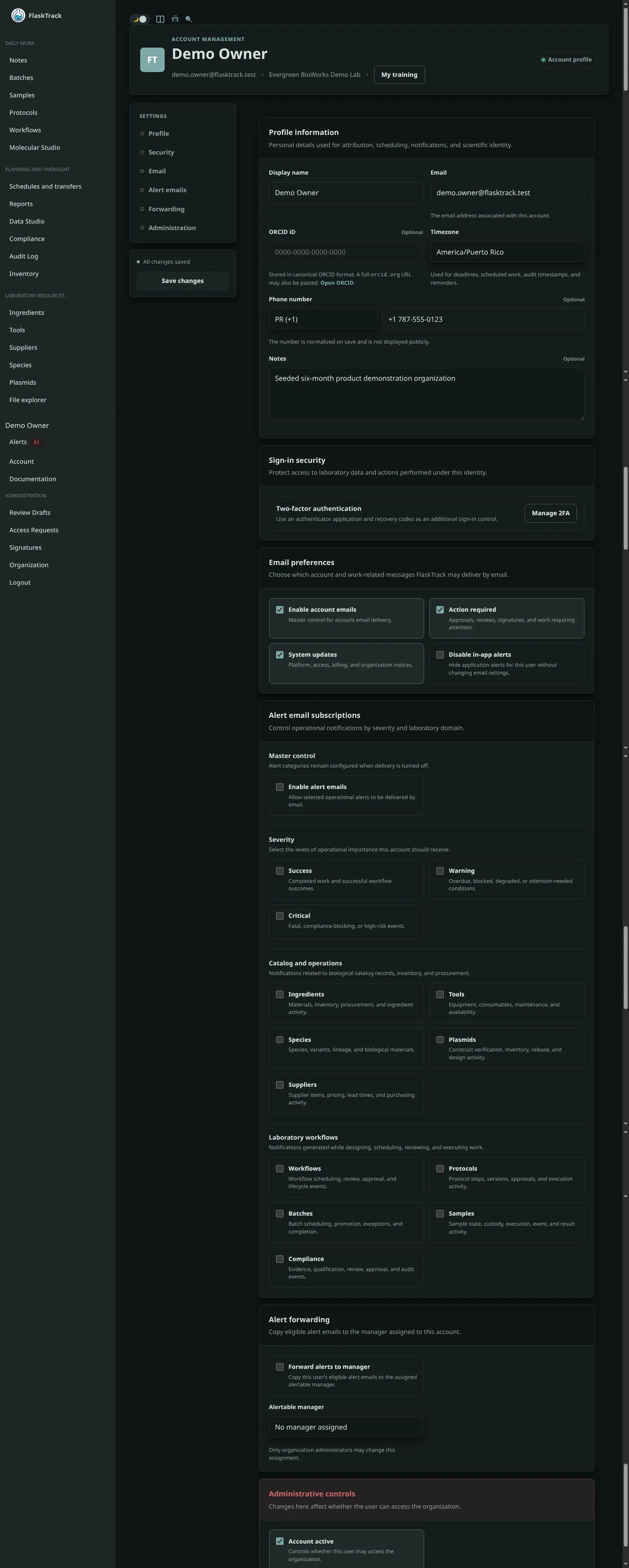
User Account
The User Account page serves as the central location for managing your personal profile, authentication settings, preferences, and account-related information within FlaskTrack.
Each user maintains their own account, allowing them to customize their experience while ensuring traceability and accountability throughout the platform.
Overview
Your account contains information used to identify actions you perform throughout FlaskTrack, including:
- Workflow execution
- Protocol reviews
- Sample handling
- Batch processing
- Compliance events
- Approvals and sign-offs
- Audit trail records
Every action performed within FlaskTrack is associated with the authenticated user account responsible for that action.
Authentication Settings
Authentication settings control how users access the platform.
Depending on organizational configuration, users may be able to:
- Change passwords
- Update login credentials
- Configure multi-factor authentication (MFA)
- Manage recovery options
- Review active login sessions
Organizations may enforce password policies and authentication requirements as part of their security program.
Organization Membership
Users may belong to one or more organizations within FlaskTrack.
The account page displays:
- Current organization memberships
- Assigned roles
- Permission levels
- Access status
Organization administrators control role assignments and permissions.
Roles and Permissions
Permissions determine which features and actions are available to a user.
Examples include:
- Viewer access
- Research staff access
- Reviewer privileges
- Compliance management
- Administrative permissions
Role assignments are managed by organization administrators and cannot typically be modified by individual users.
Notification Preferences
Users can configure how they receive notifications from FlaskTrack.
Notification settings may include:
- Access request updates
- Workflow assignments
- Review requests
- Compliance events
- Batch activity
- Sample status changes
- System announcements
Notification availability may vary based on organization settings and subscription level.
API Keys
Users with appropriate permissions may generate and manage API keys for integration with external systems.
API keys can be used to:
- Access the FlaskTrack API
- Automate workflows
- Integrate laboratory systems
- Generate reports programmatically
Security Recommendations
When using API keys:
- Store keys securely.
- Never share keys publicly.
- Rotate keys periodically.
- Revoke unused keys immediately.
All API activity is associated with the user account that created the key.
Audit Accountability
FlaskTrack maintains traceability by linking user activity to authenticated accounts.
Examples of recorded activity include:
- Record creation
- Record modification
- Workflow execution
- Step completion
- Review approvals
- Compliance events
- Access request decisions
This accountability supports regulatory, quality, and operational requirements.
Personal Preferences
Users may configure interface preferences such as:
- Theme selection
- Dark mode
- Display preferences
- Dashboard settings
- Time zone preferences
Preferences are stored per user account and do not affect other users.
Security Best Practices
To maintain account security:
- Use a strong, unique password.
- Enable multi-factor authentication when available.
- Do not share account credentials.
- Review account activity regularly.
- Report unexpected account activity immediately.
- Revoke unused API keys.
Deactivating Access
User accounts may be disabled or removed by organization administrators when access is no longer required.
Deactivated users:
- Cannot sign in.
- Retain historical audit trail associations.
- Remain referenced by records they previously created or approved.
This preserves data integrity and regulatory traceability.
Related Features
- Organizations
- Roles and Permissions
- API Keys
- Access Requests
- Audit Trail
- Compliance Management
- Workflow Execution
- Electronic Records