icon file Flask Track Docs

Create a Sample

A sample represents a single laboratory specimen that executes a reusable workflow independently.

Unlike a batch, which manages a collection of samples progressing through the same workflow together, a sample is tracked individually from the moment it is created. Every protocol execution, observation, file, note, compliance event, and workflow state transition belongs specifically to that sample.

Samples may be created directly or promoted from an existing batch during workflow execution.

Examples include:


Relationship Between Workflows and Samples

A workflow defines the standardized laboratory process.

Each sample represents one independent execution of that reusable workflow.

flowchart LR

    W["Reusable Workflow"]

    W --> P1["Protocol 1"]
    P1 --> P2["Protocol 2"]
    P2 --> P3["Protocol 3"]

    W -. creates execution .-> S["Sample"]

    S -. executes .-> P1

Unlike batches, there is only a single laboratory object being tracked.

Every protocol executed belongs exclusively to that sample.


Creating a Sample

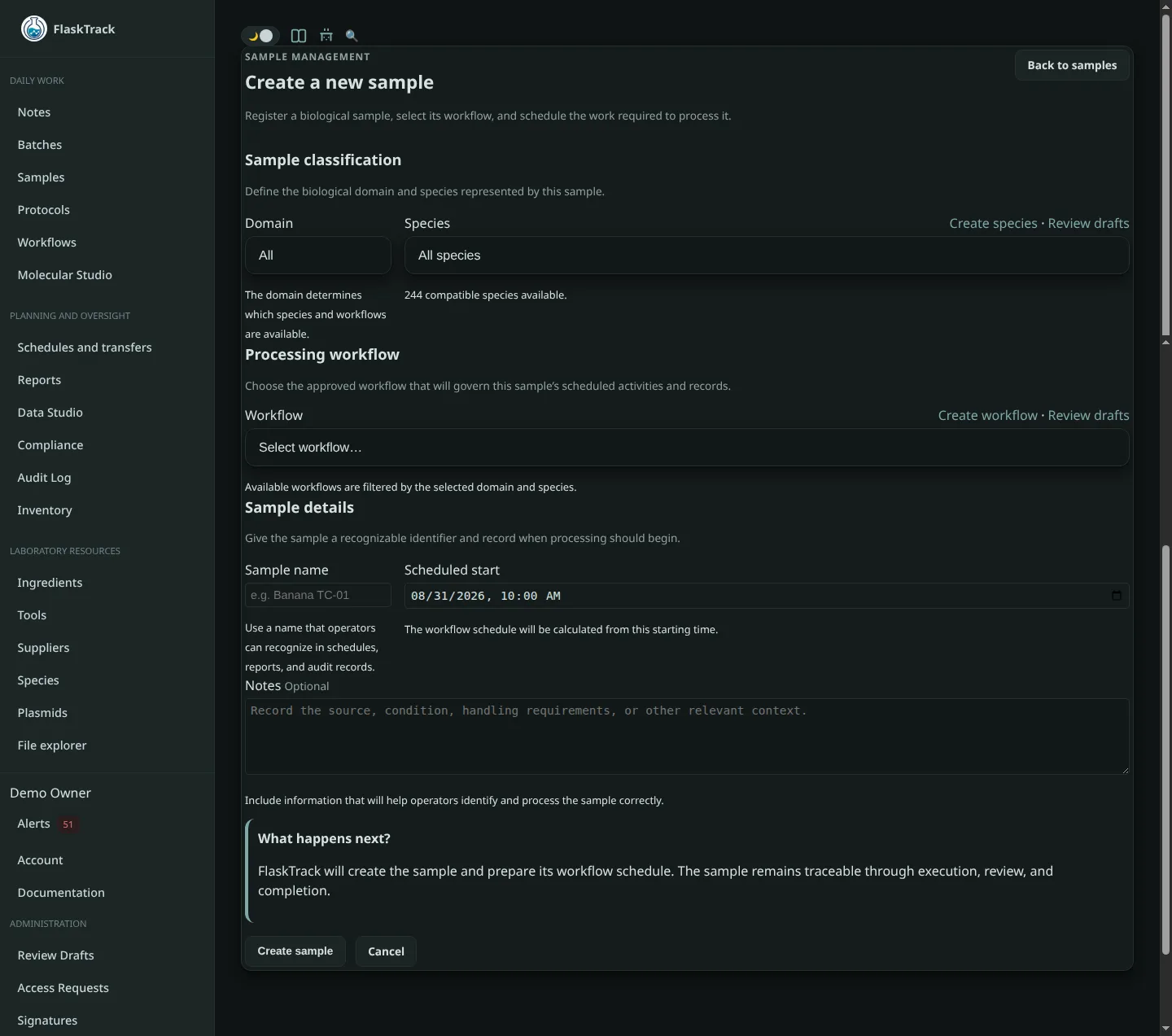
Select New Sample from the Samples page.

Creating a sample consists of selecting the reusable workflow to execute and providing basic execution information.

Required information includes:

Optional information includes:

flowchart LR
    Domain --> Species
    Species --> Workflow
    Workflow --> Sample["Create Sample"]

Domain

Select the laboratory domain.

Examples include:

The selected domain filters both available species and compatible workflows.


Species

Select the species this sample belongs to.

Species are filtered by the selected domain.

Selecting a species limits the available workflows to those designed for that organism, helping ensure appropriate laboratory procedures are followed.


Workflow

Select the workflow this sample will execute.

The selected workflow defines:

The workflow itself is never copied.

Instead, the sample becomes a live execution of that reusable workflow.

flowchart TB

    Workflow["Reusable Workflow"]

    Workflow --> Protocol1["Protocol 1"]
    Workflow --> Protocol2["Protocol 2"]
    Workflow --> Protocol3["Protocol 3"]

    Sample["New Sample"]
    Sample -. Executes .-> Workflow

The same workflow may therefore be reused indefinitely while every sample maintains its own completely independent execution history.


Sample Name

Provide a descriptive identifier for the sample.

Examples include:

Good naming conventions make samples easier to locate throughout execution, reporting, and audit history.


Scheduled For

Specify when execution is expected to begin.

Scheduling allows FlaskTrack to:

The scheduled start time becomes the reference point for protocol scheduling throughout the workflow.


Notes

Optionally record information specific to this sample.

Examples include:

Unlike workflow descriptions, these notes apply only to this individual sample.


Sample Execution

After selecting Create Sample, FlaskTrack creates a new execution of the selected workflow.

The sample immediately inherits:

flowchart LR

    Sample
        --> Workflow

    Workflow
        --> Protocols

    Protocols
        --> Execution["Laboratory Execution"]

    Execution
        --> Events["Execution Events"]

    Events
        --> Reports["Reports & Analytics"]

From this point forward, every protocol execution, laboratory observation, compliance event, attachment, note, and collected data record belongs exclusively to this sample.

Executing or modifying one sample never affects any other sample, even when they execute the same reusable workflow.


Reusing Workflows

A single workflow may be executed by thousands of independent samples.

flowchart TB

    Workflow["Agrobacterium Transformation Workflow"]

    Workflow --> S1["Sample A"]
    Workflow --> S2["Sample B"]
    Workflow --> S3["Sample C"]
    Workflow --> S4["Sample D"]
    Workflow --> SN["..."]

    S1 --> H1["Independent History"]
    S2 --> H2["Independent History"]
    S3 --> H3["Independent History"]
    S4 --> H4["Independent History"]

Every sample follows the same standardized laboratory process while maintaining its own execution history, laboratory data, files, notes, workflow progress, and audit trail.

This separation between reusable workflows and individual sample executions allows laboratories to standardize procedures while preserving complete traceability and reproducibility for every specimen.