Protocol Step Forms & Data Collection
Protocol Step Forms allow researchers and operators to capture structured execution data while performing protocol, workflow, batch, and sample activities.
FlaskTrack supports both predefined system-generated forms and fully customizable data collection forms, enabling organizations to standardize data capture while maintaining flexibility for specialized workflows.
All submitted form data becomes part of the permanent execution record and is automatically available for reporting, analytics, compliance review, and audit traceability.
Overview
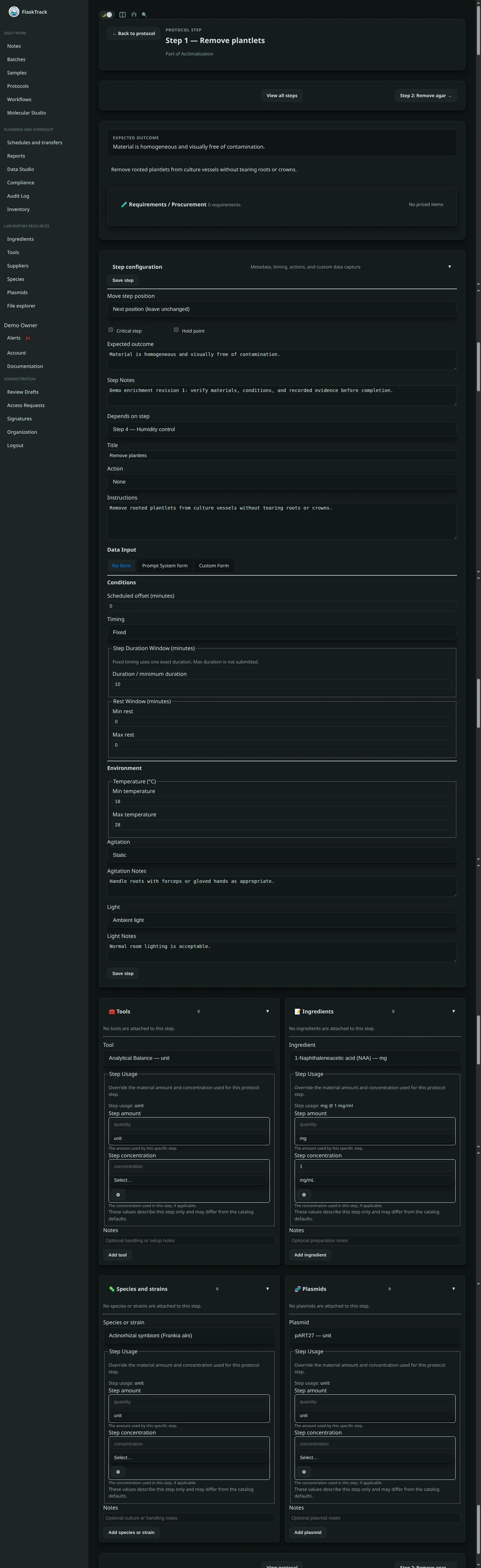
Every protocol step can optionally collect data from the user during execution.
When configuring a protocol step, administrators may choose one of three data collection modes:
| Mode | Description |
|---|---|
| No Form | Defined step data and environmental information is recorded as listed |
| System Form | FlaskTrack automatically generates a form based on the selected step action. |
| Custom Form | Administrators build a fully customized data collection form. |
Data entered during step execution becomes part of the execution history for the associated workflow, batch, sample, or protocol run.
No Form
The simplest execution mode.
Users complete the step without entering structured data. The information from the protocol step is copied to the event. If the steps min/max temperatures are 15 and 16 - this will be copied verbatim into the event.
Typical use cases:
- Simple confirmations
- Manual observations recorded elsewhere
- Administrative workflow actions
- Informational checkpoints
The execution event itself is still recorded.
Recorded information includes:
- User
- Timestamp
- Step
- Workflow
- Batch
- Sample
- Completion status
- Default protocol step metadata
System Forms
System Forms are automatically generated by FlaskTrack.
When a protocol step is assigned a specific action type, FlaskTrack can present a standardized form designed for that action. This allows users to update default step information as well as common additional fields based on the action of the step.
Examples include:
- Inspection
- Transfer
- Sterilization
- Harvest
- Inoculation
- Subculture
- Rooting
- Transformation
- Quarantine
- Disposal
- Failure Analysis
- Confirmation
System Forms help organizations enforce consistent data collection across procedures.
Benefits include:
- Standardized reporting
- Reduced configuration effort
- Consistent execution records
- Faster protocol creation
System Forms may automatically collect:
- Measurements
- Counts
- Status values
- Outcomes
- Pass / fail determinations
- Notes
- Environmental observations
Custom Forms
Custom Forms allow protocol authors to design their own structured data collection experience.
Custom Forms can contain:
- Internal species/material/ingredient drop down selections
- Internal measurement form controls
- Text fields
- Numeric fields
- Date fields
- Time fields
- Boolean values
- Dropdown selections
- Multi-select options
- Measurements
- Notes and comments
Custom forms can be tailored to:
- Research procedures
- Manufacturing workflows
- Compliance processes
- Quality control inspections
- Environmental monitoring
- Experimental observations
Validation Rules
Custom Forms support validation requirements to ensure collected data meets organizational standards.
Examples include:
- Required fields
- Minimum values
- Maximum values
- Allowed ranges
- Enumeration restrictions
- Pattern matching
- Conditional requirements
Validation occurs before a step can be completed.
This helps improve data quality and reduces reporting errors while being able to build complex protocol data entry forms to capture anything you need for reporting.
Completing a Step
When a user executes a protocol step:
- FlaskTrack evaluates step requirements.
- Required forms are displayed.
- The user enters requested data.
- Validation rules are evaluated.
- The step is submitted.
- An execution event is created.
- Collected form data is attached to the execution record.
Once completed, the information becomes part of the permanent execution history.
Execution Records
Every completed step generates a structured execution event.
Execution records contain:
- Protocol
- Workflow
- Batch
- Sample
- Step identifier
- User
- Timestamp
- Action type
- Completion status
- Form submissions
- Environmental conditions
- Notes
- Attachments (if applicable)
Execution records provide complete traceability for laboratory and operational activities.
Environmental Data
Protocol steps may define environmental requirements that operators are expected to follow during execution.
Examples include:
Temperature
- Minimum temperature
- Maximum temperature
Lighting
- Ambient
- Dark
- Constant light
- Light cycle
- Photoperiod
Agitation
- Static
- Gentle agitation
- Stirred
- Shaking
- Rocking
Additional notes can be recorded for each environmental condition.
Environmental requirements become part of the execution record and can be reported later.
Timing & Scheduling Data
Protocol steps may also define timing constraints.
Supported timing modes include:
- Fixed Duration
- Minimum Duration
- Duration Range
- Until Condition Met
Additional scheduling controls include:
- Scheduled offsets
- Minimum rest periods
- Maximum rest periods
These values are recorded alongside execution events and may be analyzed through reports.
From Execution to Reporting
Every step completion creates structured events inside the FlaskTrack operational database.
These execution events include:
- User activity
- Form submissions
- Workflow progression
- Environmental conditions
- Timing metrics
- Compliance actions
- Approval records
FlaskTrack continuously transforms these execution records into reporting datasets.
Data Lake Architecture
Execution events are automatically synchronized into the FlaskTrack reporting data lake.
The data lake serves as the analytical layer used by:
- System Reports
- Compliance Reports
- Operational Dashboards
- Data Explorer
- Custom SQL Reports
- API Reporting Endpoints
The data lake preserves execution history while optimizing analytical performance.
This separation allows transactional workflow execution and reporting workloads to scale independently.
System Reports
System Reports provide prebuilt operational visibility into collected protocol data.
Examples include:
- Workflow Throughput
- Batch Performance
- Sample Traceability
- Protocol Execution History
- Compliance Activity
- User Activity
- Failure Analysis
- Environmental Monitoring
- Material Usage
System Reports automatically incorporate submitted form data.
Custom Reports
Organizations may build custom reports using Data Explorer or SQL-based reporting.
Custom reports can combine:
- Protocol executions
- Workflow runs
- Batch records
- Sample records
- Compliance events
- User actions
- Form submissions
- Environmental observations
This allows organizations to generate highly specialized operational and scientific reporting.
Audit & Compliance Benefits
All protocol form submissions are permanently associated with:
- The executing user
- The protocol step
- The execution timestamp
- The related workflow, batch, or sample
This provides:
- Complete traceability
- Audit readiness
- Electronic record support
- Regulatory accountability
- Historical reproducibility
Every recorded value can be traced back to the exact execution event that generated it.
Best Practices
- Use System Forms whenever standardized data collection is sufficient.
- Use Custom Forms for specialized research and manufacturing workflows.
- Apply validation rules to improve data quality.
- Capture measurements in structured fields whenever possible.
- Avoid storing critical data exclusively in freeform notes.
- Build reports using structured fields rather than text searches.
- Review form designs periodically to ensure they continue supporting reporting and compliance objectives.
Related Features
- Protocols
- Workflow Execution
- Batches
- Samples
- Compliance Events
- Reports
- Data Explorer
- Audit Trail
- Access Requests
- API Reporting